반응형
■ 관성모멘트(Moment of Inertia)
3D 모델링 프로그램(CAD)이나 물리 엔진에서 물체의 관성모멘트(Moment of Inertia)를 계산할 때, 기본적으로 무게중심(Center of Gravity, CG / Center of Mass)을 기준으로 구하는 것이 표준입니다.
물리적 고유 특성: 물체가 외부 힘을 받지 않고 공간에서 자유롭게 회전할 때(예: 우주 공간이나 공중에서 회전할 때), 물체는 자연스럽게 무게중심을 축으로 회전합니다. 따라서 무게중심 기준의 관성모멘트가 물체의 고유한 회전 저항을 나타내는 가장 순수한 지표가 됩니다.
계산의 기준점: CAD 프로그램(Creo, CATIA, SolidWorks 등)에서 질량 특성(Mass Properties)을 조회하면, 대개 무게중심을 원점으로 정렬한 좌표계(Principal Coordinate System) 기준의 관성모멘트($I_{xx}, I_{yy}, I_{zz}$)를 가장 먼저 보여줍니다.
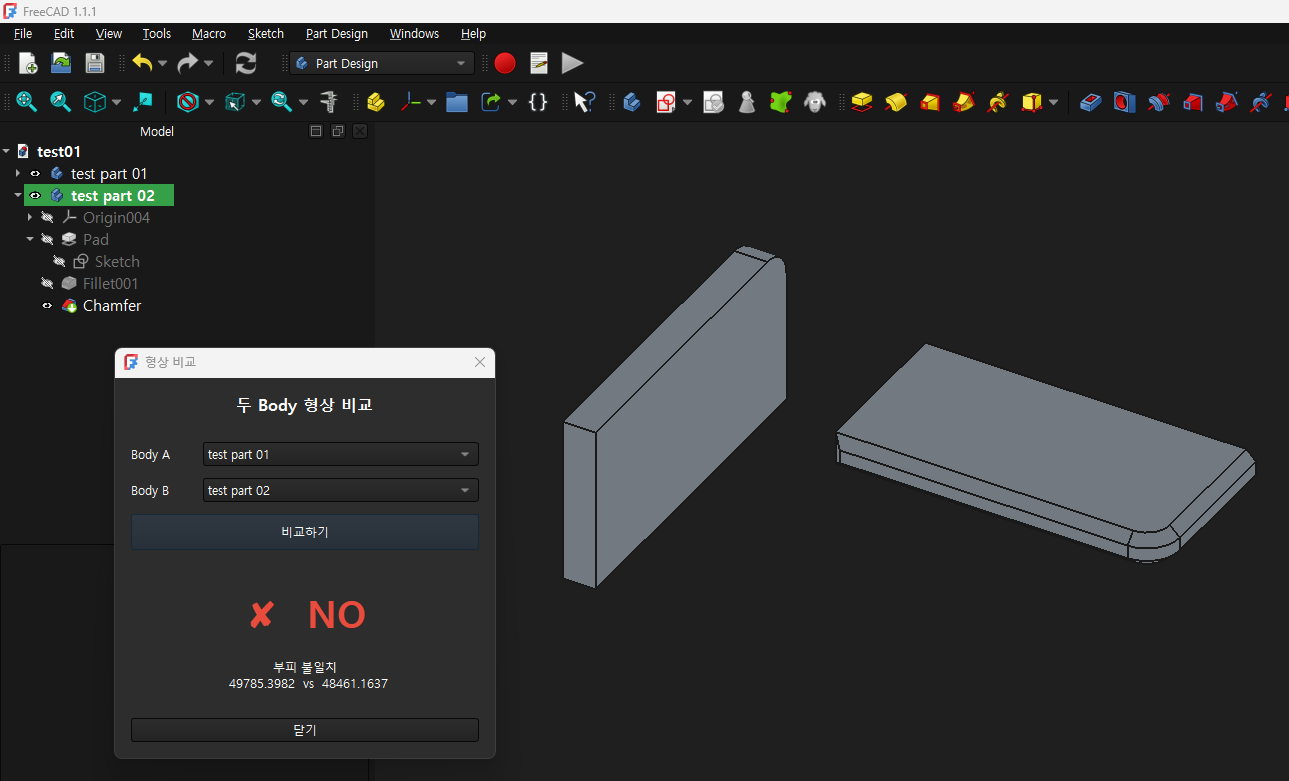
두개의 모델(Body) 형상이 동일한지 판별 해주는 프로그램
코드
"""
compare_shapes.py
두 개의 Body를 선택하여 동일 형상 여부를 YES / NO 로 표시하는 FreeCAD 매크로
FreeCAD 1.1.1 | PySide6
"""

import FreeCAD as App
import FreeCADGui as Gui
import Mesh
import math

from PySide6.QtWidgets import (
    QDialog, QVBoxLayout, QHBoxLayout, QLabel,
    QPushButton, QComboBox, QFrame, QSizePolicy
)
from PySide6.QtCore import Qt
from PySide6.QtGui import QFont


# ──────────────────────────────────────────────
#  형상 비교 로직
# ──────────────────────────────────────────────

def is_identical_shape(body1, body2, tol=1e-5):
    shape1 = body1.Shape if hasattr(body1, "Shape") else body1
    shape2 = body2.Shape if hasattr(body2, "Shape") else body2

    # 1단계: 부피 · 표면적
    if not math.isclose(shape1.Volume, shape2.Volume, rel_tol=tol):
        return False, f"부피 불일치\n  {shape1.Volume:.4f}  vs  {shape2.Volume:.4f}"

    if not math.isclose(shape1.Area, shape2.Area, rel_tol=tol):
        return False, f"표면적 불일치\n  {shape1.Area:.4f}  vs  {shape2.Area:.4f}"

    # 2단계: 토폴로지 개수
    if len(shape1.Faces) != len(shape2.Faces):
        return False, f"면 개수 불일치  ({len(shape1.Faces)} vs {len(shape2.Faces)})"

    if len(shape1.Edges) != len(shape2.Edges):
        return False, f"모서리 개수 불일치  ({len(shape1.Edges)} vs {len(shape2.Edges)})"

    if len(shape1.Vertexes) != len(shape2.Vertexes):
        return False, f"꼭짓점 개수 불일치  ({len(shape1.Vertexes)} vs {len(shape2.Vertexes)})"

    # 3단계: 관성 모멘트 (대각 성분 정렬 비교)
    m1 = shape1.MatrixOfInertia
    m2 = shape2.MatrixOfInertia
    moments1 = sorted([m1.A11, m1.A22, m1.A33])
    moments2 = sorted([m2.A11, m2.A22, m2.A33])
    for a, b in zip(moments1, moments2):
        if not math.isclose(a, b, rel_tol=tol):
            return False, f"관성 모멘트 불일치\n  {moments1}\n  vs\n  {moments2}"

    return True, "부피 · 표면적 · 토폴로지 · 관성 모멘트\n모든 항목 일치"


# ──────────────────────────────────────────────
#  GUI
# ──────────────────────────────────────────────

class CompareDialog(QDialog):
    def __init__(self, parent=None):
        super().__init__(parent)
        self.setWindowTitle("형상 비교")
        self.setMinimumWidth(380)
        self.setWindowFlags(self.windowFlags() | Qt.WindowStaysOnTopHint)
        self._build_ui()
        self._populate_combos()

    # ── UI 구성 ──────────────────────────────
    def _build_ui(self):
        root = QVBoxLayout(self)
        root.setSpacing(12)
        root.setContentsMargins(16, 16, 16, 16)

        # 타이틀
        title = QLabel("두 Body 형상 비교")
        title.setAlignment(Qt.AlignCenter)
        f = QFont(); f.setPointSize(12); f.setBold(True)
        title.setFont(f)
        root.addWidget(title)

        root.addWidget(self._hline())

        # Body 선택 콤보
        def combo_row(label_text):
            row = QHBoxLayout()
            lbl = QLabel(label_text)
            lbl.setFixedWidth(60)
            cb = QComboBox()
            cb.setSizePolicy(QSizePolicy.Expanding, QSizePolicy.Fixed)
            row.addWidget(lbl)
            row.addWidget(cb)
            return row, cb

        row1, self.cb1 = combo_row("Body A")
        row2, self.cb2 = combo_row("Body B")
        root.addLayout(row1)
        root.addLayout(row2)

        # 비교 버튼
        self.btn_compare = QPushButton("비교하기")
        self.btn_compare.setFixedHeight(36)
        self.btn_compare.clicked.connect(self._on_compare)
        root.addWidget(self.btn_compare)

        root.addWidget(self._hline())

        # 결과 표시 영역
        self.lbl_result = QLabel("—")
        self.lbl_result.setAlignment(Qt.AlignCenter)
        self.lbl_result.setWordWrap(True)
        f2 = QFont(); f2.setPointSize(28); f2.setBold(True)
        self.lbl_result.setFont(f2)
        self.lbl_result.setFixedHeight(70)
        root.addWidget(self.lbl_result)

        self.lbl_detail = QLabel("")
        self.lbl_detail.setAlignment(Qt.AlignCenter)
        self.lbl_detail.setWordWrap(True)
        root.addWidget(self.lbl_detail)

        root.addWidget(self._hline())

        # 닫기
        btn_close = QPushButton("닫기")
        btn_close.clicked.connect(self.close)
        root.addWidget(btn_close)

    def _hline(self):
        line = QFrame()
        line.setFrameShape(QFrame.HLine)
        line.setFrameShadow(QFrame.Sunken)
        return line

    # ── 콤보 채우기 ─────────────────────────
    def _populate_combos(self):
        doc = App.activeDocument()
        if doc is None:
            return

        bodies = [
            obj for obj in doc.Objects
            if obj.TypeId == "PartDesign::Body"
        ]

        for cb in (self.cb1, self.cb2):
            cb.clear()
            for b in bodies:
                cb.addItem(b.Label, b.Name)  # 표시=Label, 데이터=Name

        # 기본값: 선택된 객체가 있으면 먼저 세팅
        sel = [s.Object for s in Gui.Selection.getSelection()]
        if len(sel) >= 1:
            self._set_combo(self.cb1, sel[0].Name)
        if len(sel) >= 2:
            self._set_combo(self.cb2, sel[1].Name)

    def _set_combo(self, cb, name):
        for i in range(cb.count()):
            if cb.itemData(i) == name:
                cb.setCurrentIndex(i)
                return

    # ── 비교 실행 ────────────────────────────
    def _on_compare(self):
        doc = App.activeDocument()
        if doc is None:
            self._show_error("열린 문서가 없습니다.")
            return

        name1 = self.cb1.currentData()
        name2 = self.cb2.currentData()

        if not name1 or not name2:
            self._show_error("Body를 선택해 주세요.")
            return

        if name1 == name2:
            self._show_error("동일한 Body입니다.")
            return

        obj1 = doc.getObject(name1)
        obj2 = doc.getObject(name2)

        if obj1 is None or obj2 is None:
            self._show_error("객체를 찾을 수 없습니다.")
            return

        try:
            result, detail = is_identical_shape(obj1, obj2)
        except Exception as e:
            self._show_error(f"비교 중 오류:\n{e}")
            return

        if result:
            self.lbl_result.setText("✔  YES")
            self.lbl_result.setStyleSheet("color: #2ecc71;")
        else:
            self.lbl_result.setText("✘  NO")
            self.lbl_result.setStyleSheet("color: #e74c3c;")

        self.lbl_detail.setText(detail)

    def _show_error(self, msg):
        self.lbl_result.setText("—")
        self.lbl_result.setStyleSheet("color: gray;")
        self.lbl_detail.setText(msg)


# ──────────────────────────────────────────────
#  진입점
# ──────────────────────────────────────────────

def main():
    mw = Gui.getMainWindow()
    dlg = CompareDialog(mw)
    dlg.show()


main()
프로그램 실행 결과
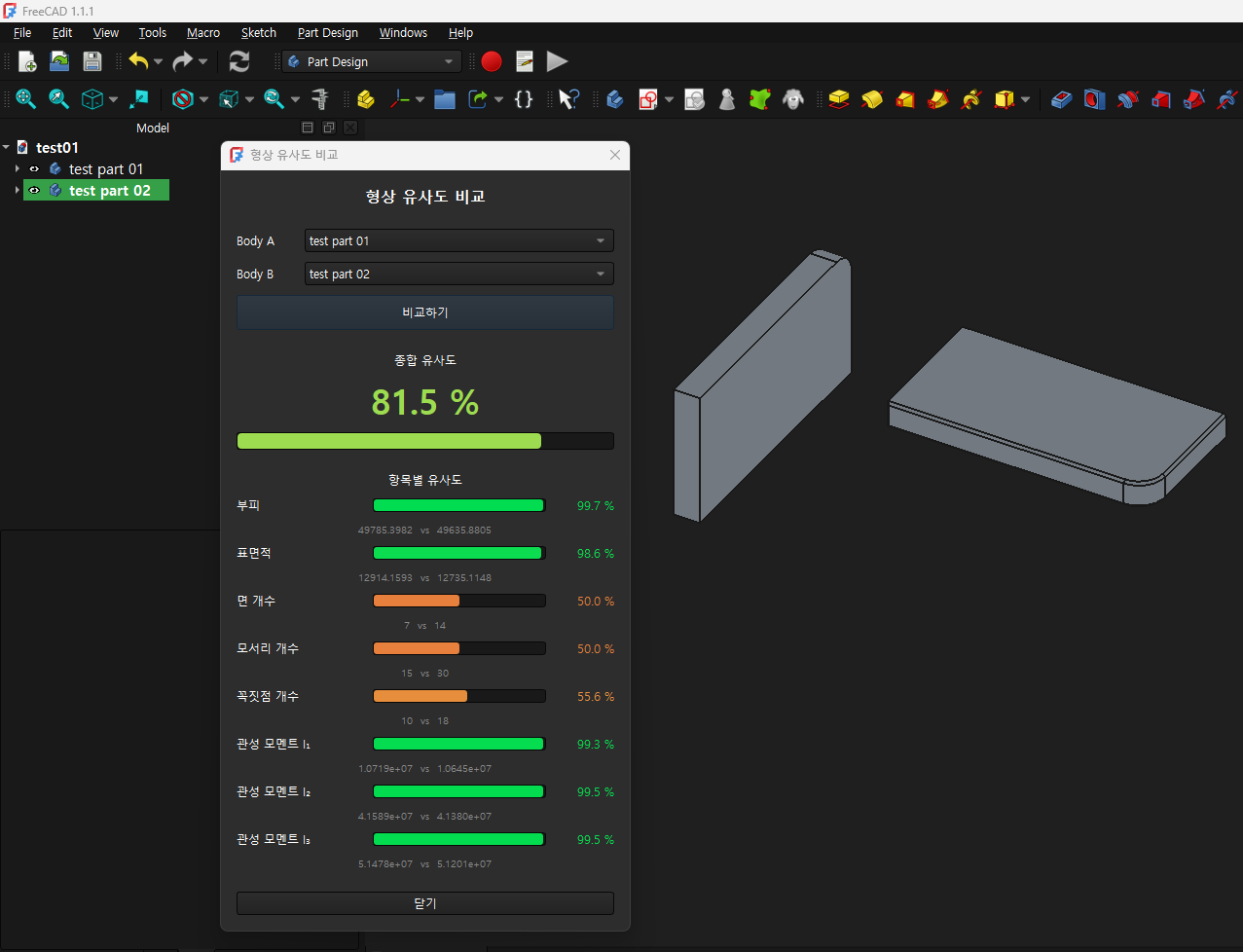
유사도 평가 프로그램
"두 개의 3D Body(형상) 유사도 비교 및 분석 매크로" 프로그램입니다. 기준좌표계가 달라도 형상 자체의 고유 기하학적 특성을 추출하여 두 모델이 얼마나 닮았는지 종합 점수(%) 및 항목별 매칭률로 시각화해 주는 훌륭한 자동화 도구입니다.
1. 핵심 기능 요약
- 좌표 독립적 형상 비교: 두 Body가 공간상에서 서로 다른 위치에 있거나 회전되어 있어도, 기하학적 불변 특성들을 추출하여 형상 자체만 비교합니다.
- 대화형 GUI 제공 (PySide6): 사용자가 콤보박스를 통해 직관적으로 Body A와 Body B를 선택하거나, FreeCAD 화면에서 객체를 미리 선택한 상태로 매크로를 실행하면 자동으로 매칭해 줍니다.
- 실시간 시각화 (Progress Bar & Color Coding): 비교 결과(0~100%)에 따라 안전(초록색), 경고(노란색), 불일치(빨간색)로 직관적인 프로그레스 바와 텍스트 색상을 업데이트합니다.
2. 세부 알고리즘 및 분석 항목 (중요 로직)
코드 내부의 compare_shapes_detail 함수는 앞서 다루었던 기하학적 필터링 단계를 정확하게 반영하고 있습니다.
① 1차 기하학적 수치 및 위상(Topology) 비교
- 부피 (Volume) & 표면적 (Area): 위치와 무관한 가장 확실한 척도입니다. 소수점 이하의 미세한 수치 차이를 비율 계산식(_similarity_pct)으로 점수화합니다.
- 위상 요소 개수: 면(Faces), 모서리(Edges), 꼭짓점(Vertexes)의 개수를 카운트합니다. 개수가 완벽히 일치하면 100.0점, 다르면 개수 비율에 따라 감점합니다.
② 2차 주 관성모멘트 정렬 비교 (회전 보정)
- MatrixOfInertia 활용: shape.MatrixOfInertia를 호출하여 두 모델의 무게중심 기준 관성 텐서 행렬을 가져옵니다.
- 정렬 정규화 (sorted): 두 모델이 회전되어 있으면 축 성분($I_{xx}, I_{yy}, I_{zz}$)의 순서가 바뀔 수 있습니다. 코드에서는 이를 sorted([m.A11, m.A22, m.A33]) 처리를 통해 크기순($I_1, I_2, I_3$)으로 강제 정렬하여 방향이 달라도 완벽하게 정밀 매칭을 수행할 수 있도록 설계되었습니다.
3. UI 및 사용자 경험(UX) 요소 분석
- WindowStaysOnTopHint 설정: self.setWindowFlags(self.windowFlags() | Qt.WindowStaysOnTopHint) 코드가 적용되어 있어, FreeCAD 메인 화면 뒤로 매크로 창이 숨지 않고 항상 위에 유지되므로 작업하기 편리합니다.
- 유연한 예외 처리 (_reset): 문서가 열려있지 않거나, 동일한 Body를 선택했거나, 연산 중 에러가 발생하면 비정상 종료(Crash)되는 대신 GUI 하단에 안전하게 메시지를 출력하도록 방어적으로 코딩되어 있습니다.
코드
"""
compare_shapes.py
두 개의 Body를 선택하여 형상 유사도(%)를 표시하는 FreeCAD 매크로
FreeCAD 1.1.1 | PySide6
"""

import FreeCAD as App
import FreeCADGui as Gui
import math

from PySide6.QtWidgets import (
    QDialog, QVBoxLayout, QHBoxLayout, QLabel,
    QPushButton, QComboBox, QFrame, QSizePolicy,
    QProgressBar
)
from PySide6.QtCore import Qt
from PySide6.QtGui import QFont, QColor


# ──────────────────────────────────────────────
#  형상 비교 로직  → 항목별 점수 반환
# ──────────────────────────────────────────────

def _similarity_pct(v1, v2, tol=1e-9):
    """두 수치의 유사도 0~100 반환 (비율 차이 기반)"""
    denom = max(abs(v1), abs(v2), tol)
    diff  = abs(v1 - v2) / denom          # 0 = 동일, 1 = 100 % 차이
    return max(0.0, 100.0 * (1.0 - diff))


def compare_shapes_detail(body1, body2):
    """
    각 항목의 유사도(0~100)와 설명을 담은 리스트를 반환.
    반환: [ {name, score, detail}, ... ]
    """
    shape1 = body1.Shape if hasattr(body1, "Shape") else body1
    shape2 = body2.Shape if hasattr(body2, "Shape") else body2

    results = []

    # ── 1. 부피 ──────────────────────────────
    v1, v2 = shape1.Volume, shape2.Volume
    score = _similarity_pct(v1, v2)
    results.append({
        "name"  : "부피",
        "score" : score,
        "detail": f"{v1:.4f}  vs  {v2:.4f}"
    })

    # ── 2. 표면적 ─────────────────────────────
    a1, a2 = shape1.Area, shape2.Area
    score = _similarity_pct(a1, a2)
    results.append({
        "name"  : "표면적",
        "score" : score,
        "detail": f"{a1:.4f}  vs  {a2:.4f}"
    })

    # ── 3. 면(Face) 개수 ──────────────────────
    f1, f2 = len(shape1.Faces), len(shape2.Faces)
    score = 100.0 if f1 == f2 else _similarity_pct(f1, f2)
    results.append({
        "name"  : "면 개수",
        "score" : score,
        "detail": f"{f1}  vs  {f2}"
    })

    # ── 4. 모서리(Edge) 개수 ─────────────────
    e1, e2 = len(shape1.Edges), len(shape2.Edges)
    score = 100.0 if e1 == e2 else _similarity_pct(e1, e2)
    results.append({
        "name"  : "모서리 개수",
        "score" : score,
        "detail": f"{e1}  vs  {e2}"
    })

    # ── 5. 꼭짓점(Vertex) 개수 ───────────────
    vx1, vx2 = len(shape1.Vertexes), len(shape2.Vertexes)
    score = 100.0 if vx1 == vx2 else _similarity_pct(vx1, vx2)
    results.append({
        "name"  : "꼭짓점 개수",
        "score" : score,
        "detail": f"{vx1}  vs  {vx2}"
    })

    # ── 6~8. 관성 모멘트 Ixx / Iyy / Izz ────
    m1 = shape1.MatrixOfInertia
    m2 = shape2.MatrixOfInertia
    ixx1, iyy1, izz1 = sorted([m1.A11, m1.A22, m1.A33])
    ixx2, iyy2, izz2 = sorted([m2.A11, m2.A22, m2.A33])

    for label, val1, val2 in (
        ("관성 모멘트 I₁", ixx1, ixx2),
        ("관성 모멘트 I₂", iyy1, iyy2),
        ("관성 모멘트 I₃", izz1, izz2),
    ):
        score = _similarity_pct(val1, val2)
        results.append({
            "name"  : label,
            "score" : score,
            "detail": f"{val1:.4e}  vs  {val2:.4e}"
        })

    return results


def overall_score(item_list):
    """항목 리스트의 단순 평균 점수"""
    if not item_list:
        return 0.0
    return sum(it["score"] for it in item_list) / len(item_list)


# ──────────────────────────────────────────────
#  색상 헬퍼
# ──────────────────────────────────────────────

def score_color(pct):
    """점수에 따라 RGB 색상 문자열 반환 (빨강 → 노랑 → 초록)"""
    if pct >= 99.999:
        return "#2ecc71"   # 초록
    elif pct >= 70:
        r = int(255 * (1 - (pct - 70) / 30))
        return f"rgb({r}, 220, 80)"
    else:
        return f"rgb(231, {int(180 * pct / 70)}, 60)"


# ──────────────────────────────────────────────
#  GUI
# ──────────────────────────────────────────────

class CompareDialog(QDialog):
    def __init__(self, parent=None):
        super().__init__(parent)
        self.setWindowTitle("형상 유사도 비교")
        self.setMinimumWidth(420)
        self.setWindowFlags(self.windowFlags() | Qt.WindowStaysOnTopHint)
        self._build_ui()
        self._populate_combos()

    # ── UI 구성 ──────────────────────────────
    def _build_ui(self):
        root = QVBoxLayout(self)
        root.setSpacing(10)
        root.setContentsMargins(16, 16, 16, 16)

        # 타이틀
        title = QLabel("형상 유사도 비교")
        title.setAlignment(Qt.AlignCenter)
        f = QFont(); f.setPointSize(12); f.setBold(True)
        title.setFont(f)
        root.addWidget(title)
        root.addWidget(self._hline())

        # Body 선택 콤보
        def combo_row(label_text):
            row = QHBoxLayout()
            lbl = QLabel(label_text)
            lbl.setFixedWidth(60)
            cb = QComboBox()
            cb.setSizePolicy(QSizePolicy.Expanding, QSizePolicy.Fixed)
            row.addWidget(lbl)
            row.addWidget(cb)
            return row, cb

        row1, self.cb1 = combo_row("Body A")
        row2, self.cb2 = combo_row("Body B")
        root.addLayout(row1)
        root.addLayout(row2)

        # 비교 버튼
        self.btn_compare = QPushButton("비교하기")
        self.btn_compare.setFixedHeight(36)
        self.btn_compare.clicked.connect(self._on_compare)
        root.addWidget(self.btn_compare)
        root.addWidget(self._hline())

        # ── 종합 유사도 ──────────────────────
        lbl_total_title = QLabel("종합 유사도")
        lbl_total_title.setAlignment(Qt.AlignCenter)
        root.addWidget(lbl_total_title)

        self.lbl_total_pct = QLabel("— %")
        self.lbl_total_pct.setAlignment(Qt.AlignCenter)
        fTotal = QFont(); fTotal.setPointSize(26); fTotal.setBold(True)
        self.lbl_total_pct.setFont(fTotal)
        root.addWidget(self.lbl_total_pct)

        self.bar_total = QProgressBar()
        self.bar_total.setRange(0, 100)
        self.bar_total.setValue(0)
        self.bar_total.setTextVisible(False)
        self.bar_total.setFixedHeight(18)
        root.addWidget(self.bar_total)

        root.addWidget(self._hline())

        # ── 항목별 결과 ──────────────────────
        lbl_items_title = QLabel("항목별 유사도")
        lbl_items_title.setAlignment(Qt.AlignCenter)
        root.addWidget(lbl_items_title)

        self.item_widgets = []   # (name_lbl, bar, pct_lbl, detail_lbl)
        ITEM_NAMES = [
            "부피", "표면적", "면 개수", "모서리 개수",
            "꼭짓점 개수", "관성 모멘트 I₁", "관성 모멘트 I₂", "관성 모멘트 I₃"
        ]
        for name in ITEM_NAMES:
            # 이름 + 퍼센트 한 줄
            hrow = QHBoxLayout()
            name_lbl = QLabel(name)
            name_lbl.setFixedWidth(130)
            pct_lbl  = QLabel("—")
            pct_lbl.setAlignment(Qt.AlignRight | Qt.AlignVCenter)
            pct_lbl.setFixedWidth(60)
            bar = QProgressBar()
            bar.setRange(0, 100)
            bar.setValue(0)
            bar.setTextVisible(False)
            bar.setFixedHeight(14)
            hrow.addWidget(name_lbl)
            hrow.addWidget(bar)
            hrow.addWidget(pct_lbl)
            root.addLayout(hrow)

            # 상세값 (작은 글씨)
            detail_lbl = QLabel("")
            detail_lbl.setAlignment(Qt.AlignCenter)
            detail_lbl.setStyleSheet("color: #888888; font-size: 10px;")
            root.addWidget(detail_lbl)

            self.item_widgets.append((name_lbl, bar, pct_lbl, detail_lbl))

        root.addWidget(self._hline())

        # 닫기
        btn_close = QPushButton("닫기")
        btn_close.clicked.connect(self.close)
        root.addWidget(btn_close)

    def _hline(self):
        line = QFrame()
        line.setFrameShape(QFrame.HLine)
        line.setFrameShadow(QFrame.Sunken)
        return line

    # ── 콤보 채우기 ─────────────────────────
    def _populate_combos(self):
        doc = App.activeDocument()
        if doc is None:
            return

        bodies = [obj for obj in doc.Objects if obj.TypeId == "PartDesign::Body"]

        for cb in (self.cb1, self.cb2):
            cb.clear()
            for b in bodies:
                cb.addItem(b.Label, b.Name)

        sel = [s.Object for s in Gui.Selection.getSelection()]
        if len(sel) >= 1:
            self._set_combo(self.cb1, sel[0].Name)
        if len(sel) >= 2:
            self._set_combo(self.cb2, sel[1].Name)

    def _set_combo(self, cb, name):
        for i in range(cb.count()):
            if cb.itemData(i) == name:
                cb.setCurrentIndex(i)
                return

    # ── 비교 실행 ────────────────────────────
    def _on_compare(self):
        doc = App.activeDocument()
        if doc is None:
            self._reset("열린 문서가 없습니다."); return

        name1 = self.cb1.currentData()
        name2 = self.cb2.currentData()
        if not name1 or not name2:
            self._reset("Body를 선택해 주세요."); return
        if name1 == name2:
            self._reset("동일한 Body를 선택했습니다."); return

        obj1 = doc.getObject(name1)
        obj2 = doc.getObject(name2)
        if obj1 is None or obj2 is None:
            self._reset("객체를 찾을 수 없습니다."); return

        try:
            items = compare_shapes_detail(obj1, obj2)
        except Exception as e:
            self._reset(f"오류: {e}"); return

        total = overall_score(items)
        color = score_color(total)

        # 종합 점수 업데이트
        self.lbl_total_pct.setText(f"{total:.1f} %")
        self.lbl_total_pct.setStyleSheet(f"color: {color};")
        self.bar_total.setValue(int(total))
        self.bar_total.setStyleSheet(
            f"QProgressBar::chunk {{ background-color: {color}; border-radius: 4px; }}"
        )

        # 항목별 업데이트
        for idx, item in enumerate(items):
            if idx >= len(self.item_widgets):
                break
            _, bar, pct_lbl, detail_lbl = self.item_widgets[idx]
            sc = item["score"]
            c  = score_color(sc)
            bar.setValue(int(sc))
            bar.setStyleSheet(
                f"QProgressBar::chunk {{ background-color: {c}; border-radius: 3px; }}"
            )
            pct_lbl.setText(f"{sc:.1f} %")
            pct_lbl.setStyleSheet(f"color: {c};")
            detail_lbl.setText(item["detail"])

    def _reset(self, msg=""):
        self.lbl_total_pct.setText("— %")
        self.lbl_total_pct.setStyleSheet("color: gray;")
        self.bar_total.setValue(0)
        self.bar_total.setStyleSheet("")
        for _, bar, pct_lbl, detail_lbl in self.item_widgets:
            bar.setValue(0)
            bar.setStyleSheet("")
            pct_lbl.setText("—")
            pct_lbl.setStyleSheet("color: gray;")
            detail_lbl.setText(msg if _ == self.item_widgets[0][0] else "")
        if msg:
            self.item_widgets[0][3].setText(msg)


# ──────────────────────────────────────────────
#  진입점
# ──────────────────────────────────────────────

def main():
    mw = Gui.getMainWindow()
    dlg = CompareDialog(mw)
    dlg.show()

main()
프로그램 실행 화면
주의
| 미러(Mirror, 대칭) 형상 판별: 현재 알고리즘(부피, 표면적, 개수, 주 관성모멘트 크기)은 오른손잡이용 부품과 왼손잡이용(대칭) 부품을 구별하지 못하고 100% 동일하다고 판단합니다. 만약 대칭 부품까지 잡아내야 한다면 [4단계]에 주축의 방향성(행렬식 기하 연산)이나 정점의 외적 방향 검증을 추가하면 완벽해집니다. |
by korealionkk@gmail.com
반응형
'업무 자동화 > FreeCAD' 카테고리의 다른 글
| 모델 유사성 평가 프로그램 컨 (1) | 2026.06.13 |
|---|---|
| 도면 정보 (0) | 2026.06.11 |
| Python] 모델 무게중심 구하기 (0) | 2026.06.06 |
| AI를 학습 시킬수 있을까? - 컨셉 (0) | 2026.06.05 |
| AI로 자동 설계 프로그램 만들기 - N단 Shaft (업데이트) (0) | 2026.06.01 |


