사용자가 작업 화면에서 하나 이상의 3D 객체(부품)를 선택하고 이 매크로를 실행하면, 선택한 객체의 무게중심(Center of Mass), 부피, 표면적, 그리고 바운딩 박스(객체를 감싸는 최소 크기의 상자)의 크기를 계산하여 보기 좋은 GUI 창(다이얼로그)과 콘솔창에 출력해 줍니다. 추가로 무게중심 위치에 시각적인 점(Marker)을 생성하는 기능도 포함되어 있습니다.

코드
"""
FreeCAD 무게중심(Center of Mass) 계산 매크로
- 선택된 객체의 무게중심, 부피, 표면적, 바운딩 박스 정보 출력
- 무게중심 위치에 마커(Point) 생성 옵션 포함
"""

import FreeCAD as App
import FreeCADGui as Gui
try:
    from PySide6 import QtWidgets, QtCore, QtGui
except ImportError:
    from PySide2 import QtWidgets, QtCore, QtGui


class CenterOfMassDialog(QtWidgets.QDialog):
    def __init__(self, results):
        super().__init__(Gui.getMainWindow())
        self.results = results
        self.setWindowTitle("무게중심 분석 결과")
        self.setMinimumWidth(480)
        self.setWindowFlags(self.windowFlags() | QtCore.Qt.WindowStaysOnTopHint)
        self._build_ui()

    def _build_ui(self):
        layout = QtWidgets.QVBoxLayout(self)
        layout.setSpacing(10)
        layout.setContentsMargins(14, 14, 14, 14)

        # 타이틀
        title = QtWidgets.QLabel("⚖️  무게중심 분석 결과")
        title.setStyleSheet("font-size: 15px; font-weight: bold; color: #2c3e50; padding-bottom: 4px;")
        layout.addWidget(title)

        # 결과가 없을 때
        if not self.results:
            lbl = QtWidgets.QLabel("⚠️ 선택된 객체가 없거나 형상 데이터가 없습니다.")
            lbl.setStyleSheet("color: #e74c3c; padding: 8px;")
            layout.addWidget(lbl)
        else:
            for r in self.results:
                layout.addWidget(self._make_card(r))

        # 닫기 버튼
        btn_row = QtWidgets.QHBoxLayout()
        btn_row.addStretch()

        if self.results:
            btn_marker = QtWidgets.QPushButton("📍 무게중심 마커 생성")
            btn_marker.setStyleSheet(
                "padding: 6px 16px; background-color: #2980b9; color: white; "
                "border: none; border-radius: 4px; font-size: 12px;"
            )
            btn_marker.clicked.connect(self._create_markers)
            btn_row.addWidget(btn_marker)

        btn_close = QtWidgets.QPushButton("닫기")
        btn_close.setStyleSheet(
            "padding: 6px 16px; background-color: #7f8c8d; color: white; "
            "border: none; border-radius: 4px; font-size: 12px;"
        )
        btn_close.clicked.connect(self.accept)
        btn_row.addWidget(btn_close)
        layout.addLayout(btn_row)

    def _make_card(self, r):
        frame = QtWidgets.QFrame()
        frame.setStyleSheet(
            "QFrame { background-color: #f4f6f8; border: 1px solid #dce1e7; "
            "border-radius: 6px; }"
        )
        vbox = QtWidgets.QVBoxLayout(frame)
        vbox.setContentsMargins(12, 10, 12, 10)
        vbox.setSpacing(4)

        # 객체명
        name_lbl = QtWidgets.QLabel(f"🔩 {r['name']}")
        name_lbl.setStyleSheet("font-weight: bold; font-size: 13px; color: #2c3e50;")
        vbox.addWidget(name_lbl)

        sep = QtWidgets.QFrame()
        sep.setFrameShape(QtWidgets.QFrame.HLine)
        sep.setStyleSheet("color: #ccc;")
        vbox.addWidget(sep)

        grid = QtWidgets.QGridLayout()
        grid.setHorizontalSpacing(20)
        grid.setVerticalSpacing(3)

        rows = [
            ("무게중심 X", f"{r['com'].x:+.4f} mm"),
            ("무게중심 Y", f"{r['com'].y:+.4f} mm"),
            ("무게중심 Z", f"{r['com'].z:+.4f} mm"),
            ("부피",       f"{r['volume']:.4f} mm³  ({r['volume']/1000:.4f} cm³)"),
            ("표면적",     f"{r['area']:.4f} mm²"),
            ("BB 크기 X",  f"{r['bb_x']:.4f} mm"),
            ("BB 크기 Y",  f"{r['bb_y']:.4f} mm"),
            ("BB 크기 Z",  f"{r['bb_z']:.4f} mm"),
        ]

        for i, (label, value) in enumerate(rows):
            lbl = QtWidgets.QLabel(label + ":")
            lbl.setStyleSheet("color: #555; font-size: 12px;")
            val = QtWidgets.QLabel(value)
            val.setStyleSheet("font-family: monospace; font-size: 12px; color: #1a252f;")
            val.setTextInteractionFlags(QtCore.Qt.TextSelectableByMouse)
            grid.addWidget(lbl, i, 0)
            grid.addWidget(val, i, 1)

        vbox.addLayout(grid)
        return frame

    def _create_markers(self):
        """무게중심 위치에 포인트 마커를 FreeCAD 문서에 추가"""
        doc = App.ActiveDocument
        if not doc:
            return
        for r in self.results:
            com = r['com']
            pt = doc.addObject("Part::Vertex", f"COM_{r['name']}")
            pt.X = com.x
            pt.Y = com.y
            pt.Z = com.z
            pt.Label = f"COM_{r['name']}"
        doc.recompute()
        App.Console.PrintMessage(
            f"{len(self.results)}개 무게중심 마커가 생성되었습니다.\n"
        )


def get_center_of_mass():
    selection = Gui.Selection.getSelection()
    results = []

    if not selection:
        App.Console.PrintWarning("⚠️ 선택된 객체가 없습니다. 객체를 먼저 선택하세요.\n")
    else:
        for obj in selection:
            if not (hasattr(obj, 'Shape') and obj.Shape):
                App.Console.PrintWarning(
                    f"'{obj.Name}' 은(는) 형상 데이터가 없어 건너뜁니다.\n"
                )
                continue

            shape = obj.Shape
            com   = shape.CenterOfMass
            bb    = shape.BoundBox

            results.append({
                'name':   obj.Label,
                'com':    com,
                'volume': shape.Volume,
                'area':   shape.Area,
                'bb_x':   bb.XLength,
                'bb_y':   bb.YLength,
                'bb_z':   bb.ZLength,
            })

            # 콘솔에도 출력
            App.Console.PrintMessage(
                f"\n=== [{obj.Label}] 무게중심 분석 ===\n"
                f"  무게중심: ({com.x:+.4f}, {com.y:+.4f}, {com.z:+.4f}) mm\n"
                f"  부피    : {shape.Volume:.4f} mm³\n"
                f"  표면적  : {shape.Area:.4f} mm²\n"
                f"  BB 크기 : {bb.XLength:.4f} x {bb.YLength:.4f} x {bb.ZLength:.4f} mm\n"
            )

    # GUI 다이얼로그 표시
    dlg = CenterOfMassDialog(results)
    dlg.exec_()


# 실행
get_center_of_mass()
무게중심만으로는 사이즈를 알 수 없지만, 이미 코드에 포함된 바운딩 박스(BoundBox: BB) 정보를 활용하면 됩니다.무게중심 단독으로는 사이즈를 알 수 없고, 바운딩 박스(BoundBox) 가 치수 정보를 제공합니다.
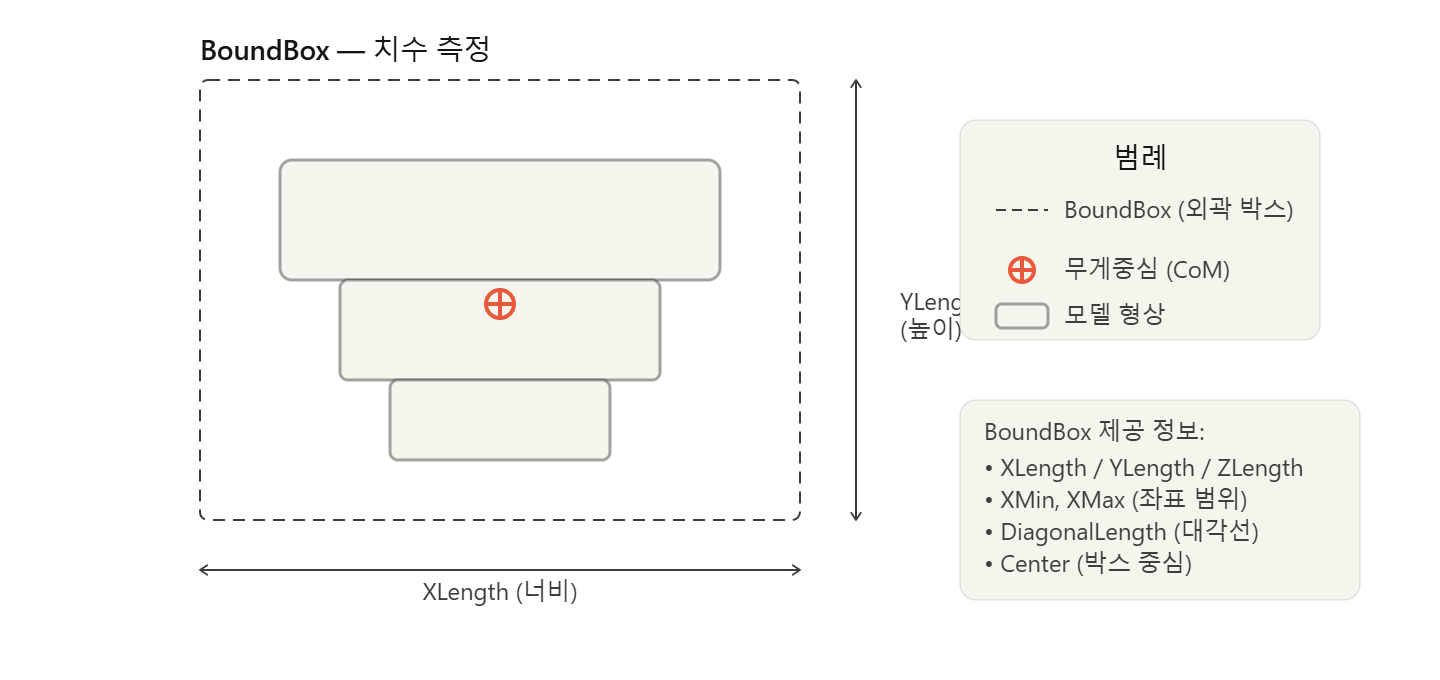
결론적으로:
- CenterOfMass → 무게중심 좌표 (X, Y, Z 위치만 알려줌, 치수 아님)
- BoundBox → 실제 치수 정보 (이미 코드에 포함되어 있음)
무게중심과 바운딩 박스 중심(bb.Center)이 일치하지 않는 경우, 모델이 비대칭 이라는 것도 확인할 수 있습니다.
FreeCAD는 전역 좌표계(Global Coordinate System) 기준으로 무게중심을 계산합니다.

FreeCAD(오픈소스 3D CAD 소프트웨어)에서 작동하는 '무게중심(Center of Mass) 및 형상 분석 매크로' 프로그램입니다.
FreeCAD 내부의 객체들을 자동으로 탐색하여 기계설계나 3D 모델링에서 중요한 물리적 성질들을 계산하고, 이를 사용자가 보기 편하도록 깔끔한 GUI(그래픽 인터페이스) 창과 콘솔 창에 동시에 출력해 주는 역할을 합니다.
1. 대상 객체 자동 탐색 및 수집 (collect_bodies)
문서 내에서 분석할 수 있는 3D 형상(Shape)을 가진 객체들을 다음 3단계 우선순위에 따라 똑똑하게 찾아냅니다.
- 1순위: PartDesign 워크벤치로 생성된 표준 Body 객체들을 먼저 찾습니다.
- 2순위: Body가 없다면 다른 객체에 종속되지 않은 최상위 형상 객체(Part::Feature 등)를 찾습니다.
- 3순위: 그것도 없다면 형상(Shape) 정보가 들어있는 데이터라면 모두 긁어모아 분석 대상으로 삼습니다.
2. 정밀 기하학적 형상 분석 (analyze_body)
수집된 각 객체의 3D 데이터를 바탕으로 다음 물리량들을 정밀하게 계산합니다.
- 무게중심 (Center of Mass): 객체의 질량 중심점 좌표 $(X, Y, Z)$
- 부피 및 표면적: 모델의 총 부피($mm^3$ 및 $cm^3$ 단위 변환 포함)와 겉넓이($mm^2$)
- 바운딩 박스 (Bounding Box): 객체를 감싸는 가장 작은 직육면체 상자의 크기($X, Y, Z$ 길이) 및 상자의 중심점 좌표
- 오차 분석: 무게중심과 바운딩 박스 중심 간의 거리 차이($\Delta X, \Delta Y, \Delta Z$)를 계산하여 형상이 한쪽으로 얼마나 치우쳐져 있는지 쉽게 알 수 있게 합니다.
코드
"""
FreeCAD 무게중심(Center of Mass) 계산 매크로 v2
- 활성 문서의 모든 Body를 자동 탐색
- Body 별 무게중심, 부피, 표면적, 바운딩 박스 출력
- 무게중심 위치에 마커(Point) 생성 옵션 포함
"""

import FreeCAD as App
import FreeCADGui as Gui

try:
    from PySide6 import QtWidgets, QtCore, QtGui
except ImportError:
    from PySide2 import QtWidgets, QtCore, QtGui


# ── 문서에서 Body 목록 수집 ────────────────────────────────────────────────────
def collect_bodies(doc):
    """
    활성 문서에서 형상을 가진 객체를 수집한다.
    우선순위:
      1) PartDesign::Body  (Body)
      2) Part::Feature / App::Part 등 Shape 보유 최상위 객체
      3) 위 두 종류가 없으면 Shape 보유 모든 객체
    """
    if not doc:
        return []

    bodies = []

    # 1순위: PartDesign Body
    for obj in doc.Objects:
        if obj.TypeId == "PartDesign::Body":
            bodies.append(obj)

    if bodies:
        return bodies

    # 2순위: Shape를 직접 가진 최상위 Part/Feature
    for obj in doc.Objects:
        if hasattr(obj, 'Shape') and obj.Shape and not obj.Shape.isNull():
            # 다른 객체의 하위(InList)가 아닌 최상위 객체만
            if not obj.InList:
                bodies.append(obj)

    if bodies:
        return bodies

    # 3순위: Shape 보유 전체
    for obj in doc.Objects:
        if hasattr(obj, 'Shape') and obj.Shape and not obj.Shape.isNull():
            bodies.append(obj)

    return bodies


# ── Body 한 개 분석 ────────────────────────────────────────────────────────────
def analyze_body(obj):
    """
    Body(또는 Shape 보유 객체)의 무게중심 등 정보를 dict 로 반환.
    PartDesign::Body 의 경우 Tip(최종 Feature) 의 Shape 를 사용한다.
    """
    # PartDesign Body → Tip 의 Shape 우선 사용
    shape = None
    if obj.TypeId == "PartDesign::Body":
        tip = getattr(obj, 'Tip', None)
        if tip and hasattr(tip, 'Shape') and tip.Shape and not tip.Shape.isNull():
            shape = tip.Shape
    if shape is None:
        if hasattr(obj, 'Shape') and obj.Shape and not obj.Shape.isNull():
            shape = obj.Shape

    if shape is None:
        return None

    com = shape.CenterOfMass
    bb  = shape.BoundBox

    return {
        'name':    obj.Label,
        'type_id': obj.TypeId,
        'com':     com,
        'volume':  shape.Volume,
        'area':    shape.Area,
        'bb_x':    bb.XLength,
        'bb_y':    bb.YLength,
        'bb_z':    bb.ZLength,
        'bb_cx':   bb.Center.x,
        'bb_cy':   bb.Center.y,
        'bb_cz':   bb.Center.z,
        'obj':     obj,          # 마커 생성 시 참조용
    }


# ── GUI 다이얼로그 ─────────────────────────────────────────────────────────────
class CenterOfMassDialog(QtWidgets.QDialog):
    def __init__(self, results, skipped):
        super().__init__(Gui.getMainWindow())
        self.results = results
        self.skipped = skipped
        self.setWindowTitle("무게중심 분석 결과 — Body 별")
        self.setMinimumWidth(520)
        self.setMinimumHeight(200)
        self.resize(540, min(140 + len(results) * 260, 700))
        self.setWindowFlags(self.windowFlags() | QtCore.Qt.WindowStaysOnTopHint)
        self._build_ui()

    # ── 전체 레이아웃 ─────────────────────────────────────────────────────────
    def _build_ui(self):
        root = QtWidgets.QVBoxLayout(self)
        root.setSpacing(8)
        root.setContentsMargins(14, 14, 14, 14)

        # 타이틀
        title = QtWidgets.QLabel("⚖️  Body 별 무게중심 분석")
        title.setStyleSheet(
            "font-size: 15px; font-weight: bold; color: #2c3e50; padding-bottom: 2px;"
        )
        root.addWidget(title)

        doc = App.ActiveDocument
        doc_name = doc.Name if doc else "없음"
        sub = QtWidgets.QLabel(f"문서: {doc_name}  |  Body 수: {len(self.results)}개")
        sub.setStyleSheet("font-size: 11px; color: #7f8c8d; padding-bottom: 4px;")
        root.addWidget(sub)

        # 결과 없음
        if not self.results:
            lbl = QtWidgets.QLabel("⚠️ 분석 가능한 Body / 형상 객체가 없습니다.")
            lbl.setStyleSheet("color: #e74c3c; padding: 8px;")
            root.addWidget(lbl)
        else:
            # 스크롤 영역
            scroll = QtWidgets.QScrollArea()
            scroll.setWidgetResizable(True)
            scroll.setFrameShape(QtWidgets.QFrame.NoFrame)
            container = QtWidgets.QWidget()
            vbox = QtWidgets.QVBoxLayout(container)
            vbox.setSpacing(8)
            vbox.setContentsMargins(0, 0, 4, 0)
            for r in self.results:
                vbox.addWidget(self._make_card(r))
            vbox.addStretch()
            scroll.setWidget(container)
            root.addWidget(scroll)

        # 스킵된 객체 안내
        if self.skipped:
            warn = QtWidgets.QLabel(
                f"ℹ️ 형상 없음으로 건너뜀: {', '.join(self.skipped)}"
            )
            warn.setStyleSheet(
                "font-size: 11px; color: #e67e22; padding: 4px 0;"
            )
            warn.setWordWrap(True)
            root.addWidget(warn)

        # 버튼 행
        btn_row = QtWidgets.QHBoxLayout()
        btn_row.addStretch()

        if self.results:
            btn_marker = QtWidgets.QPushButton("📍 무게중심 마커 생성")
            btn_marker.setStyleSheet(
                "padding: 6px 16px; background-color: #2980b9; color: white; "
                "border: none; border-radius: 4px; font-size: 12px;"
            )
            btn_marker.clicked.connect(self._create_markers)
            btn_row.addWidget(btn_marker)

        btn_close = QtWidgets.QPushButton("닫기")
        btn_close.setStyleSheet(
            "padding: 6px 16px; background-color: #7f8c8d; color: white; "
            "border: none; border-radius: 4px; font-size: 12px;"
        )
        btn_close.clicked.connect(self.accept)
        btn_row.addWidget(btn_close)
        root.addLayout(btn_row)

    # ── 카드 위젯 ─────────────────────────────────────────────────────────────
    def _make_card(self, r):
        frame = QtWidgets.QFrame()
        frame.setStyleSheet(
            "QFrame { background-color: #f4f6f8; border: 1px solid #dce1e7; "
            "border-radius: 6px; }"
        )
        vbox = QtWidgets.QVBoxLayout(frame)
        vbox.setContentsMargins(12, 10, 12, 10)
        vbox.setSpacing(4)

        # 헤더: Body 이름 + TypeId
        hdr = QtWidgets.QHBoxLayout()
        name_lbl = QtWidgets.QLabel(f"🔩 {r['name']}")
        name_lbl.setStyleSheet(
            "font-weight: bold; font-size: 13px; color: #2c3e50;"
        )
        type_lbl = QtWidgets.QLabel(r['type_id'])
        type_lbl.setStyleSheet(
            "font-size: 10px; color: #95a5a6; padding-left: 6px;"
        )
        hdr.addWidget(name_lbl)
        hdr.addWidget(type_lbl)
        hdr.addStretch()
        vbox.addLayout(hdr)

        sep = QtWidgets.QFrame()
        sep.setFrameShape(QtWidgets.QFrame.HLine)
        sep.setStyleSheet("color: #ccc;")
        vbox.addWidget(sep)

        grid = QtWidgets.QGridLayout()
        grid.setHorizontalSpacing(20)
        grid.setVerticalSpacing(3)
        grid.setColumnStretch(1, 1)

        com = r['com']
        rows = [
            ("무게중심 X",      f"{com.x:+.4f} mm"),
            ("무게중심 Y",      f"{com.y:+.4f} mm"),
            ("무게중심 Z",      f"{com.z:+.4f} mm"),
            ("부피",            f"{r['volume']:.4f} mm³  "
                                f"({r['volume']/1000:.4f} cm³)"),
            ("표면적",          f"{r['area']:.4f} mm²"),
            ("BB 크기 X",       f"{r['bb_x']:.4f} mm"),
            ("BB 크기 Y",       f"{r['bb_y']:.4f} mm"),
            ("BB 크기 Z",       f"{r['bb_z']:.4f} mm"),
            ("BB 중심 X",       f"{r['bb_cx']:+.4f} mm"),
            ("BB 중심 Y",       f"{r['bb_cy']:+.4f} mm"),
            ("BB 중심 Z",       f"{r['bb_cz']:+.4f} mm"),
            ("CoM ↔ BB 중심 ΔX", f"{com.x - r['bb_cx']:+.4f} mm"),
            ("CoM ↔ BB 중심 ΔY", f"{com.y - r['bb_cy']:+.4f} mm"),
            ("CoM ↔ BB 중심 ΔZ", f"{com.z - r['bb_cz']:+.4f} mm"),
        ]

        for i, (label, value) in enumerate(rows):
            lbl = QtWidgets.QLabel(label + ":")
            lbl.setStyleSheet("color: #555; font-size: 12px;")
            val = QtWidgets.QLabel(value)
            val.setStyleSheet(
                "font-family: monospace; font-size: 12px; color: #1a252f;"
            )
            val.setTextInteractionFlags(QtCore.Qt.TextSelectableByMouse)
            grid.addWidget(lbl, i, 0)
            grid.addWidget(val, i, 1)

        vbox.addLayout(grid)
        return frame

    # ── 마커 생성 ─────────────────────────────────────────────────────────────
    def _create_markers(self):
        doc = App.ActiveDocument
        if not doc:
            return

        created = 0
        for r in self.results:
            body_name = r['name']
            com       = r['com']
            body_obj  = r['obj']          # PartDesign::Body 객체 참조

            label = (f"CoM_{body_name}  "
                     f"({com.x:+.2f}, {com.y:+.2f}, {com.z:+.2f})")

            # ── 방법 1: PartDesign::Body → Origin 방식으로 내부 Point Feature 추가
            #    PartDesign Body 안에는 PartDesign Feature 만 허용되므로
            #    Draft::Point 를 생성한 뒤 Body 의 Group 에 직접 편입한다.
            pt = None

            # Draft::Point 시도 (Draft 워크벤치 없이도 TypeId 직접 생성 가능)
            try:
                import Draft
                vec = App.Vector(com.x, com.y, com.z)
                pt  = Draft.make_point(vec.x, vec.y, vec.z)
                pt.Label = label
            except Exception:
                pt = None

            # Draft 실패 시 Part::Vertex 로 폴백
            if pt is None:
                try:
                    pt = doc.addObject("Part::Vertex", f"CoM_{body_name}")
                    pt.X = com.x
                    pt.Y = com.y
                    pt.Z = com.z
                    pt.Label = label
                except Exception as e:
                    App.Console.PrintError(
                        f"  ❌ [{body_name}] 마커 생성 실패: {e}\n"
                    )
                    continue

            # Body 소속으로 편입
            #   PartDesign::Body  → addObject() 메서드 사용
            #   그 외 객체        → Group 프로퍼티에 직접 추가
            inserted = False
            if body_obj.TypeId == "PartDesign::Body":
                try:
                    body_obj.addObject(pt)
                    inserted = True
                except Exception:
                    pass

            if not inserted:
                # App::Part, App::DocumentObjectGroup 등 Group 프로퍼티 보유 객체
                if hasattr(body_obj, 'Group'):
                    grp = list(body_obj.Group)
                    grp.append(pt)
                    body_obj.Group = grp
                    inserted = True

            if not inserted:
                App.Console.PrintWarning(
                    f"  ⚠️ [{body_name}] Body 내부 편입 불가 — "
                    f"문서 루트에 생성됩니다.\n"
                )

            created += 1
            App.Console.PrintMessage(
                f"  📍 [{body_name}] 마커 생성 → "
                f"({com.x:+.4f}, {com.y:+.4f}, {com.z:+.4f}) mm\n"
            )

        doc.recompute()
        App.Console.PrintMessage(
            f"✅ {created}개 Body 무게중심 마커가 각 Body 내부에 생성되었습니다.\n"
        )


# ── 메인 실행 ─────────────────────────────────────────────────────────────────
def run():
    doc = App.ActiveDocument
    if not doc:
        App.Console.PrintError("❌ 열린 문서가 없습니다.\n")
        return

    App.Console.PrintMessage(
        f"\n{'='*50}\n"
        f"[무게중심 분석] 문서: {doc.Name}\n"
        f"{'='*50}\n"
    )

    bodies  = collect_bodies(doc)
    results = []
    skipped = []

    if not bodies:
        App.Console.PrintWarning("⚠️ 문서에 분석 가능한 Body가 없습니다.\n")
    else:
        App.Console.PrintMessage(
            f"→ 탐색된 객체 수: {len(bodies)}개\n\n"
        )
        for obj in bodies:
            r = analyze_body(obj)
            if r is None:
                skipped.append(obj.Label)
                App.Console.PrintWarning(
                    f"  ⚠️ '{obj.Label}' 형상 없음 — 건너뜁니다.\n"
                )
                continue
            results.append(r)
            com = r['com']
            App.Console.PrintMessage(
                f"  ✔ [{r['name']}]\n"
                f"     무게중심 : ({com.x:+.4f}, {com.y:+.4f}, {com.z:+.4f}) mm\n"
                f"     부피     : {r['volume']:.4f} mm³\n"
                f"     BB 크기  : {r['bb_x']:.4f} × "
                f"{r['bb_y']:.4f} × {r['bb_z']:.4f} mm\n"
            )

    dlg = CenterOfMassDialog(results, skipped)
    dlg.exec_()


run()

By korealionkk@gmail.com
'업무 자동화 > FreeCAD' 카테고리의 다른 글
| 도면 정보 (0) | 2026.06.11 |
|---|---|
| 관성모멘트(Moment of Inertia) 계산하기 (0) | 2026.06.06 |
| AI를 학습 시킬수 있을까? - 컨셉 (0) | 2026.06.05 |
| AI로 자동 설계 프로그램 만들기 - N단 Shaft (업데이트) (0) | 2026.06.01 |
| AI로 자동 설계 프로그램 만들기 - N단 Shaft (0) | 2026.05.30 |


