반응형
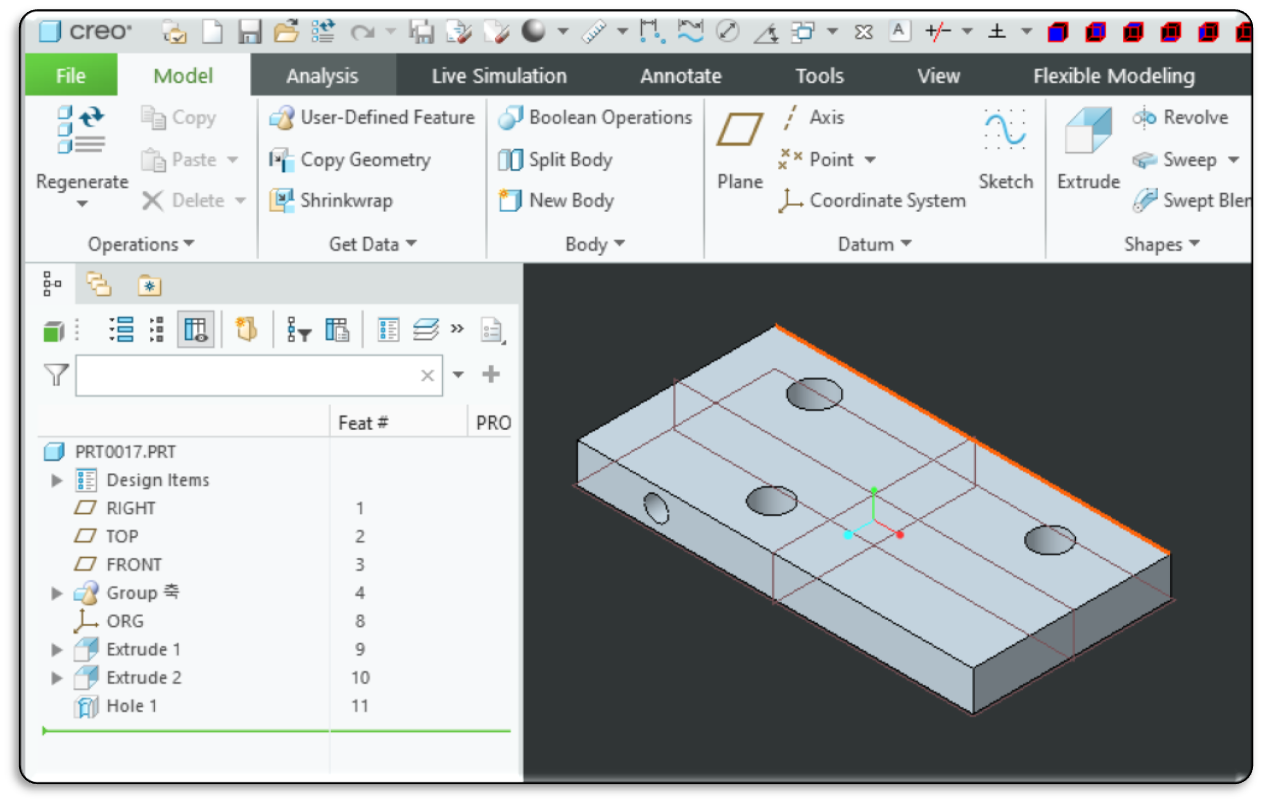
번호, 중심위치(X), 중심위치(Y), 직경만 출력하는 코드를 만들어 봅니다. 로직 자체는 중복된 서피스(예: 반원통 2개로 이루어진 홀)를 하나로 합쳐서 보여주기 위해 여전히 그룹화 방식을 유지합니다.
다음 로직으로 작동합니다.
- 모든 실린더 서피스를 스캔합니다.
- 각 실린더의 **X좌표, Y좌표, 직경(Diameter)**을 구합니다.
- 이 값들을 조합하여 고유한 키(Key)를 만듭니다. (예: "10.50|20.00|5.00")
- 최종적으로 집계된 리스트를 출력합니다.
💻Sample code
Option Explicit

' ==============================================================================
' 함수명: AutoFindHoleGroups_NoQty
' 설명: 활성 모델의 실린더 서피스를 스캔하여 고유한 홀 위치를 찾습니다.
'       (중심 위치와 직경이 같으면 하나의 홀로 간주)
' 출력: 번호 | 중심 X | 중심 Y | 직경
' ==============================================================================
Sub AutoFindHoleGroups_NoQty()

    On Error GoTo ErrorHandler

    ' 1. 연결 초기화 및 모델 확인
    Call Connect.CreoConnect ' 필요시 주석 해제
    Dim model As IpfcModel
    Set model = BaseSession.CurrentModel

    If model Is Nothing Then
        MsgBox "활성화된 모델이 없습니다.", vbExclamation
        Exit Sub
    End If

    Debug.Print "=== 모델명: " & model.fileName & " 홀 리스트 추출 시작 ==="

    ' 2. 서피스 수집
    Dim ItemOwner As IpfcModelItemOwner
    Set ItemOwner = model
    Dim allSurfaces As IpfcModelItems
    Set allSurfaces = ItemOwner.ListItems(EpfcModelItemType.EpfcITEM_SURFACE)

    If allSurfaces Is Nothing Or allSurfaces.Count = 0 Then
        Debug.Print "서피스가 없습니다."
        Exit Sub
    End If

    ' 3. 중복 제거를 위한 Dictionary (Key: "X|Y|Dia")
    Dim holeDict As Object
    Set holeDict = CreateObject("Scripting.Dictionary")

    Dim i As Long
    Dim surface As IpfcSurface
    Dim modelItem As IpfcModelItem
    Dim transSurface As IpfcTransformedSurface
    Dim coordSys As IpfcTransform3D
    Dim origin As IpfcPoint3D
    Dim cylinderGeo As IpfcCylinder

    Dim posX As Double, posY As Double, dia As Double
    Dim uniqueKey As String

    ' 4. 전체 서피스 순회 및 데이터 추출
    For i = 0 To allSurfaces.Count - 1
        Set modelItem = allSurfaces.Item(i)
        Set surface = modelItem

        ' 실린더 타입만 처리
        If surface.GetSurfaceType = EpfcSurfaceType.EpfcSURFACE_CYLINDER Then

            ' 좌표계 추출
            Set transSurface = surface
            Set coordSys = transSurface.coordSys
            Set origin = coordSys.GetOrigin

            ' 직경 추출
            Set cylinderGeo = surface
            dia = cylinderGeo.Radius * 2

            ' 좌표값 가져오기
            posX = origin.Item(0)
            posY = origin.Item(1)

            ' Key 생성 (소수점 3자리 기준)
            uniqueKey = Format(posX, "0.000") & "|" & _
                        Format(posY, "0.000") & "|" & _
                        Format(dia, "0.000")

            ' Dictionary에 키가 없으면 추가 (중복 방지)
            If Not holeDict.Exists(uniqueKey) Then
                holeDict.Add uniqueKey, "Exist"
            End If

        End If
    Next i

    ' 5. 결과 출력 (수량 제외)
    Debug.Print ""
    Debug.Print "=========================================================="
    Debug.Print " No.  |   Center X   |   Center Y   |   Diameter"
    Debug.Print "----------------------------------------------------------"

    Dim keys As Variant
    keys = holeDict.keys

    Dim parts() As String
    Dim idx As Integer
    Dim outputX As String, outputY As String, outputDia As String

    For idx = 0 To holeDict.Count - 1
        ' 키 분해 (X|Y|Dia)
        parts = Split(keys(idx), "|")

        outputX = parts(0)
        outputY = parts(1)
        outputDia = parts(2)

        ' 포맷에 맞춰 출력
        Debug.Print PadRight(CStr(idx + 1), 6) & "| " & _
                    PadRight(outputX, 13) & "| " & _
                    PadRight(outputY, 13) & "| " & _
                    PadRight(outputDia, 13)
    Next idx

    Debug.Print "=========================================================="

    MsgBox "추출 완료! 총 " & holeDict.Count & " 개의 홀 위치를 찾았습니다.", vbInformation

    Exit Sub

ErrorHandler:
    MsgBox "오류 발생: " & Err.Description
End Sub

' ==============================================================================
' 보조 함수: 문자열 길이 맞춤 (정렬용)
' ==============================================================================
Function PadRight(sText As String, nLen As Integer) As String
    If Len(sText) < nLen Then
        PadRight = sText & Space(nLen - Len(sText))
    Else
        PadRight = sText
    End If
End Function
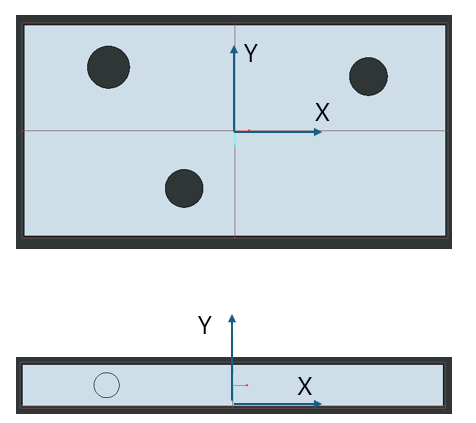
출력 결과 예시
=== 모델명: prt0017.prt 홀 리스트 추출 시작 ===
==========================================================
No. | Center X | Center Y | Diameter
----------------------------------------------------------
1 | -60.000 | 0.000 | 20.000
2 | -24.105 | 20.000 | 18.000
3 | 63.426 | 20.000 | 18.000
4 | -60.000 | 10.000 | 12.000
==========================================================
by korealionkk@gmail.com
반응형
'업무 자동화 > VBA, VB.NET For Creo' 카테고리의 다른 글
| 모델의 요소를 가져오는 순서 (The order in which the model's elements are retrieved) (0) | 2025.12.05 |
|---|---|
| Interface IpfcTransformedSurface (0) | 2025.11.21 |
| 솔리드 모델의 실린더 서피스 수량 계산 (0) | 2025.11.20 |
| 모델에서 제일 작은 서피스 평면 면적 구하기 (0) | 2025.11.19 |
| Interface IpfcSurface (1) | 2025.11.18 |


