반응형
인터페이스는 Creo 모델링에서 평면, 원통, 원뿔 등 수학적으로 정의 가능한(Analytical) 서피스들이 공간상에 어디에 위치하고 어느 방향을 바라보고 있는지를 정의하는 핵심 클래스입니다. 이 인터페이스는 "자체적인 좌표계(Origin 및 Unit Vectors)를 가진 서피스"를 의미합니다.
- 일반 서피스(IpfcSurface):
단순히 면적이나 형상 정보만 가집니다. - 변환된 서피스(IpfcTransformedSurface):
형상 정보뿐만 아니라, 이 형상이 3D 공간(Global Coordinate) 내에서 어디에(위치), 어떻게(회전) 놓여 있는지에 대한 정보(CoordSys)를 포함합니다.
우리가 흔히 다루는 평면(Plane), 원통(Cylinder), 원뿔(Cone) 등은 모두 이 인터페이스를 상속받습니다. 즉, 이 형상들의 중심점이나 축(Axis) 방향을 알아내려면 반드시 이 인터페이스를 거쳐야 합니다.
◎ Property CoordSys as IpfcTransform3D
이 인터페이스의 핵심은 단 하나, CoordSys 속성입니다.
- 속성명: CoordSys
- 데이터 타입: IpfcTransform3D (변환 매트릭스)
- 역할: 서피스의 원점(Origin)과 방향 벡터(X, Y, Z축)를 반환합니다.
이 IpfcTransform3D 객체를 통해 다음과 같은 정보를 얻을 수 있습니다.
- Origin (원점):
- IpfcPlane (평면)의 경우: 평면 위의 임의의 기준점
- IpfcCylinder (원통)의 경우: 원통 축의 시작점
- IpfcCone (원뿔)의 경우: 원뿔의 꼭짓점 또는 기준점
- Z-Axis (Z축 벡터):
- 일반적으로 서피스의 법선 벡터(Normal Vector) 또는 회전축 역할을 합니다.
- 예: 원통의 경우 Z축이 바로 원통의 길이 방향(중심축)입니다.
💻Sample code :
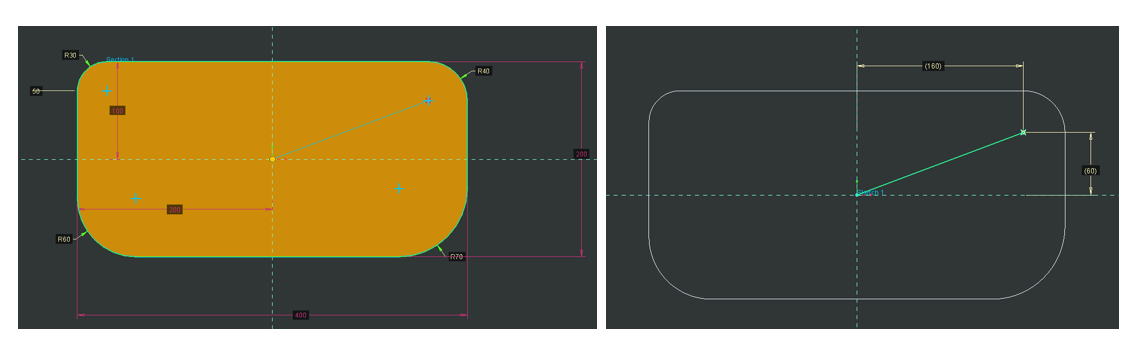
Option Explicit

'// ==============================================================================//'
'// 함수명: AutoFindCylinderSurfaces//'
'// 설명: 활성 모델의 모든 서피스를 스캔하여 '원통(Cylinder)'만 찾아내고//'
'//       그 좌표(Origin)와 축(Axis) 정보를 디버그 창에 출력합니다.//'
'// ============================================================================== //'
Sub AutoFindCylinderSurfaces()

    On Error GoTo ErrorHandler

    '// 1. 연결 초기화 (기존 모듈 활용) //'
    Call Connect.CreoConnect

    '// 2. 현재 활성화된 모델 가져오기 //'
    Dim model As IpfcModel
    Set model = BaseSession.CurrentModel

    If model Is Nothing Then
        MsgBox "활성화된 모델이 없습니다.", vbExclamation
        Exit Sub
    End If

    Debug.Print "=== 모델명: " & model.fileName & " 실린더 검색 시작 ==="

    '// 3. 모델 내의 모든 서피스 아이템 수집 //'
    Dim ItemOwner As IpfcModelItemOwner
    Set ItemOwner = model

    Dim allSurfaces As IpfcModelItems
    Set allSurfaces = ItemOwner.ListItems(EpfcModelItemType.EpfcITEM_SURFACE)

    If allSurfaces Is Nothing Or allSurfaces.Count = 0 Then
        Debug.Print "서피스가 없는 모델입니다."
        Exit Sub
    End If

    '// 4. 루프를 돌며 원통(Cylinder)인지 확인 //'
    Dim i As Long
    Dim countCylinders As Integer
    countCylinders = 0

    For i = 0 To allSurfaces.Count - 1

        Dim modelItem As IpfcModelItem
        Set modelItem = allSurfaces.Item(i)

        Dim surface As IpfcSurface
        Set surface = modelItem ' ModelItem -> Surface 캐스팅

        '// 4-1. 서피스 타입 체크 (Cylinder만 통과) //'
        If surface.GetSurfaceType = EpfcSurfaceType.EpfcSURFACE_CYLINDER Then

            countCylinders = countCylinders + 1

            '// ================================================================== //'
            '// [핵심 로직] IpfcTransformedSurface 인터페이스 사용 //'
            '// ================================================================== //'

            '// 5. TransformedSurface로 변환 //'
            Dim transSurface As IpfcTransformedSurface
            Set transSurface = surface

            '// 6. CoordSys 추출 //'
            Dim coordSys As IpfcTransform3D
            Set coordSys = transSurface.coordSys

            '// 7. 데이터 추출 //'
            Dim origin As IpfcPoint3D
            Set origin = coordSys.GetOrigin

            Dim zAxis As IpfcVector3D
            Set zAxis = coordSys.GetZAxis

            '// 8. 결과 출력 (Immediate Window: Ctrl+G 확인) //'
            Debug.Print "--------------------------------------------------"
            Debug.Print "[Cylinder ID: " & modelItem.id & "]"

            Debug.Print "  Origin : (" & _
                        Format(origin.Item(0), "0.00") & ", " & _
                        Format(origin.Item(1), "0.00") & ", " & _
                        Format(origin.Item(2), "0.00") & ")"

            Debug.Print "  Axis Vec: (" & _
                        Format(zAxis.Item(0), "0.00") & ", " & _
                        Format(zAxis.Item(1), "0.00") & ", " & _
                        Format(zAxis.Item(2), "0.00") & ")"

            '// [Tip] 원통의 반지름(Radius)도 구할 수 있습니다. //'
            '// IpfcCylinder 인터페이스로 변환 필요 //'
            Dim cylinderGeo As IpfcCylinder
            Set cylinderGeo = surface
            Debug.Print "  Radius : " & Format(cylinderGeo.Radius)

        End If

    Next i

    Debug.Print "=================================================="
    MsgBox "검색 완료! 총 " & countCylinders & "개의 실린더를 찾았습니다." & vbCrLf & _
           "(상세 정보는 VBA 편집기의 '직접 실행' 창을 확인하세요)", vbInformation

    Exit Sub

ErrorHandler:
    MsgBox "오류 발생: " & Err.Description
End Sub
프로그램 실행 결과
=== 모델명: prt0017.prt 실린더 검색 시작 ===
--------------------------------------------------
[Cylinder ID: 19213]
  Origin : (-170.00, 70.00, 0.00)
  Axis Vec: (0.00, 0.00, 1.00)
  Radius : 30
--------------------------------------------------
[Cylinder ID: 19217]
  Origin : (-140.00, -40.00, 0.00)
  Axis Vec: (0.00, 0.00, 1.00)
  Radius : 60
--------------------------------------------------
[Cylinder ID: 19221]
  Origin : (130.00, -30.00, 0.00)
  Axis Vec: (0.00, 0.00, 1.00)
  Radius : 70
--------------------------------------------------
[Cylinder ID: 19225]
  Origin : (160.00, 60.00, 0.00)
  Axis Vec: (0.00, 0.00, 1.00)
  Radius : 40
==================================================
by korealionkk@gmail.com
반응형
'업무 자동화 > VBA, VB.NET For Creo' 카테고리의 다른 글
| 모델의 요소를 가져오는 순서 (The order in which the model's elements are retrieved) (0) | 2025.12.05 |
|---|---|
| 솔리드 모델의 동일한 실린더 서피스 중심 위치 및 직경 값 구하기 (0) | 2025.11.21 |
| 솔리드 모델의 실린더 서피스 수량 계산 (0) | 2025.11.20 |
| 모델에서 제일 작은 서피스 평면 면적 구하기 (0) | 2025.11.19 |
| Interface IpfcSurface (1) | 2025.11.18 |


