반응형
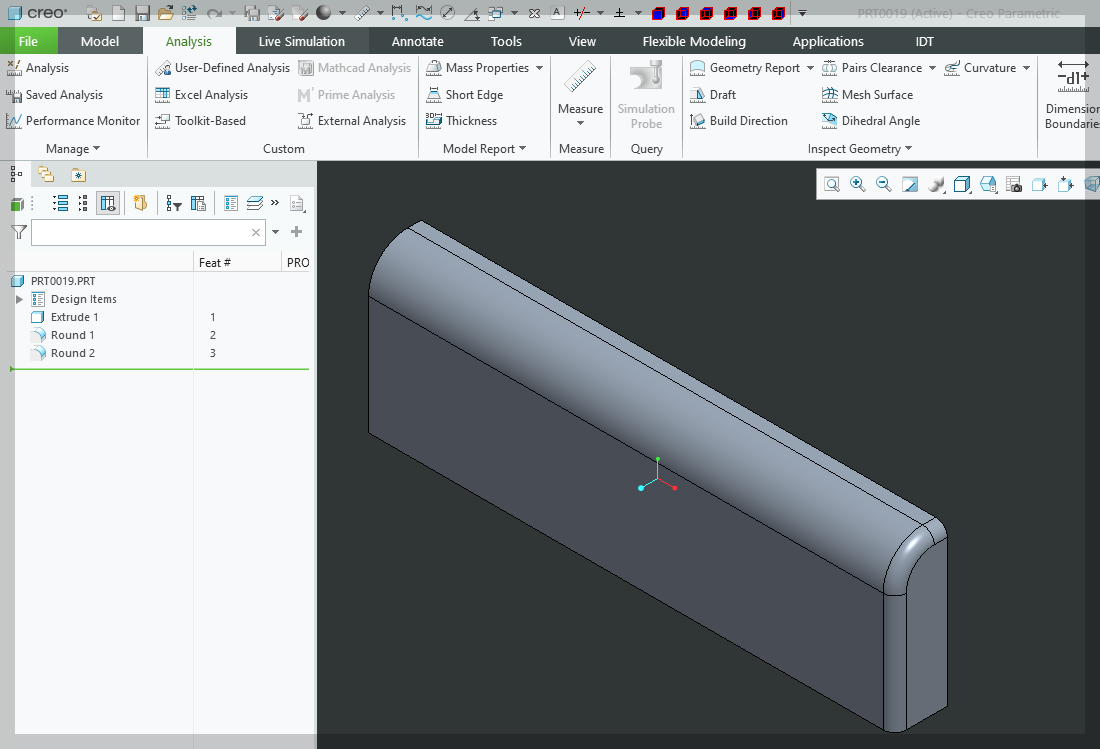
◎ Find the smallest surface plane area in the part model
Import all types of surface objects from a solid model, and calculate the area of only planar surfaces by id among the objects.
💻Sample code
creo connection module
Option Explicit

'// Declare a public variable: Make it accessible throughout the module. //'
Public asynconn As pfcls.CCpfcAsyncConnection
Public conn As pfcls.IpfcAsyncConnection
Public BaseSession As pfcls.IpfcBaseSession

'*******************************************************************************
' Sub: CreoConnect
' Description: Connect to Creo Parametric and initialize the BaseSession object.
'              Checks whether Creo is running, including error handling.
'*******************************************************************************'

Public Sub CreoConnect()

    '// Jump to ErrorHandler label when an error occurs //'
    On Error GoTo ErrorHandler

    ' // 1. If a Connection object has not yet been created, a new one is created. //'
    If asynconn Is Nothing Then
        '// Create a CCpfcAsyncConnection object (assign an instance to a variable declared using the New keyword) //'
        Set asynconn = New pfcls.CCpfcAsyncConnection
    End If

    ' // 2. Creo Connection Settings: Attempt to connect asynchronously to Creo //'
    ' // Connect(ServerName, Password, WorkingDirectory, Timeout) //'
    ' // Typically, ServerName and Password are set to "", and WorkingDirectory is set to "." (current directory). //'
    ' // Timeout is in seconds. //'
    Set conn = asynconn.Connect("", "", ".", 5) '// 5 second timeout //'

    '// 3.Get the BaseSession object //'
    '// If the connection is successful, the conn object contains a BaseSession. //'
    Set BaseSession = conn.Session

    '// If the connection is successful, skip the error handler and exit. //'
    '// Terminates the Sub gracefully, preventing the flow from passing to the ErrorHandler. //'
Exit Sub

'// ------------------------------------------------------------------------------- //'
'// Error handling handler //'
ErrorHandler:

    '// Error handling when Creo connection library (Toolkit) is not found or Creo is not running //'
    If InStr(Err.Description, "XToolKitNotFound") > 0 Or _
       InStr(Err.Description, "Connect:") > 0 Then '// Errors that may occur in the Connect function //'

        MsgBox "오류: Creo Parametric에 연결할 수 없습니다." & vbCrLf & _
               "1. Creo가 실행 중인지 확인하십시오." & vbCrLf & _
               "2. Creo API 환경 설정(Pro/TOOLKIT)을 확인하십시오.", vbCritical, "Creo Connection Error"

    Else
        ' // Other general error handling //'
        MsgBox "예기치 않은 오류가 발생했습니다." & vbCrLf & _
               "오류 번호: " & Err.Number & vbCrLf & _
               "오류 내용: " & Err.Description, vbCritical, "General Error"
    End If

    '// Initialize global variables when an error occurs (if necessary) //'
    Set conn = Nothing
    Set BaseSession = Nothing
    Set asynconn = Nothing '// Since asynconn can be reused depending on the error type, you can decide whether to keep it or release it depending on your error recovery strategy. //'

End Sub
Calculate minimum area
'----------------------------------------------------------------------
' Creo Parametric VBA API
' 1. EpfcModelItemType.EpfcITEM_SURFACE로 모든 서피스 수집
' 2. 루프 내부에서 평면(EpfcSURFACE_PLANE)인지 판별
' 3. 평면 중 최소 면적 계산
'----------------------------------------------------------------------

Sub FindSmallestPlanarSurfaceArea_Fixed()

    On Error GoTo RunError

    '// 1. 연결 초기화
    Call Connect.CreoConnect

    Dim CurrentModel As IpfcModel
    Set CurrentModel = BaseSession.CurrentModel

    If CurrentModel Is Nothing Then
        MsgBox "Creo Parametric에서 활성화된 모델이 없습니다.", vbCritical
        Exit Sub
    End If

    Debug.Print "Model: " & CurrentModel.fileName

    '// 2. 서피스 리스트 가져오기 (요청하신 EpfcITEM_SURFACE 사용)
    Dim ItemOwner As IpfcModelItemOwner
    Set ItemOwner = CurrentModel

    Dim SurfaceList As IpfcModelItems
    '// 모델의 모든 서피스를 가져옵니다.
    Set SurfaceList = ItemOwner.ListItems(EpfcModelItemType.EpfcITEM_SURFACE)

    Debug.Print "Total Surfaces Found: " & SurfaceList.Count

    Dim SurfaceItem As IpfcModelItem
    Dim SurfaceObject As IpfcSurface
    Dim ItemID As Integer
    Dim CurrentArea As Double

    '// 최소값 저장을 위한 변수
    Dim MinArea As Double
    Dim MinSurfID As Integer
    Dim IsFirstFound As Boolean

    IsFirstFound = False
    MinArea = 0
    MinSurfID = 0

    '// 3. 루프 시작
    For Each SurfaceItem In SurfaceList

        '// IpfcModelItem을 IpfcSurface 인터페이스로 변환
        '// (GetSurfaceType과 EvalArea를 사용하기 위함)
        Set SurfaceObject = SurfaceItem

        '// [중요] 평면 인식 코드 추가
        '// 가져온 서피스가 "평면(Plane)" 타입인지 확인합니다.
        '// EpfcSurfaceType 열거형을 사용하여 타입을 비교합니다.
        If SurfaceObject.GetSurfaceType = EpfcSurfaceType.EpfcSURFACE_PLANE Then

            ItemID = SurfaceItem.id

            '// 평면인 경우에만 면적 계산 (EvalArea)
            CurrentArea = SurfaceObject.EvalArea

            '// --- 최소값 판별 로직 ---
            If IsFirstFound = False Then
                '// 첫 번째로 발견된 평면을 기준값으로 설정
                MinArea = CurrentArea
                MinSurfID = ItemID
                IsFirstFound = True
            Else
                '// 기존 최소값보다 현재 평면의 면적이 더 작으면 갱신
                If CurrentArea < MinArea Then
                    MinArea = CurrentArea
                    MinSurfID = ItemID
                End If
            End If

        End If 'End of Plane Check

    Next SurfaceItem

    '// 4. 결과 리포트 작성
    Dim Report As String
    Report = "--- 최소 평면(Planar) 면적 분석 결과 ---" & vbCrLf
    Report = Report & "모델 이름: " & CurrentModel.fileName & vbCrLf & vbCrLf

    If IsFirstFound Then
        Report = Report & "가장 작은 평면 ID: " & MinSurfID & vbCrLf
        Report = Report & "면적 값: " & Format(MinArea, "0.00000")

        MsgBox Report, vbInformation, "최소 면적 찾기 완료"
    Else
        MsgBox "이 모델에서 '평면(Plane)' 타입을 찾지 못했습니다.", vbExclamation
    End If

    Exit Sub

RunError:
    MsgBox "에러 발생: " & Err.Description, vbCritical

End Sub
by korealionkk@gmail.com
반응형
'업무 자동화 > VBA, VB.NET For Creo' 카테고리의 다른 글
| Interface IpfcTransformedSurface (0) | 2025.11.21 |
|---|---|
| 솔리드 모델의 실린더 서피스 수량 계산 (0) | 2025.11.20 |
| Interface IpfcSurface (1) | 2025.11.18 |
| Creo VBA : 서피스 분석 - 실린더 중심축 위치 계산 (0) | 2025.11.18 |
| Creo VBA : 서피스 분석 - 실린더 면적 계산 (0) | 2025.11.18 |


