반응형
■법선 벡터
법선
normal line normal은 '목수가 쓰는 곱자(직각자)'를 뜻하는 라틴어 어원 'norma'에서 유래하여,
namu.wiki
서피스(평면 등)의 법선 벡터 방향을 통해 3차원 공간에서 다음과 같은 다양한 핵심 정보들을 알 수 있습니다.
1. 면이 향하고 있는 방향 (면의 방위)
- 평면이 3차원 공간 상에서 정확히 어느 쪽(위, 아래, 앞, 뒤, 혹은 특정 대각선 방향)을 바라보고 있는지 명확한 방위를 알 수 있습니다.
2. 기준 좌표계와의 수직 관계
- 글로벌 좌표계를 기준으로 이 면이 어떤 축(X, Y, Z)에 평행하게 놓여 있는지 파악할 수 있습니다.
(예를 들어, 법선 벡터가 (0, 0, 1)이라면 절대 좌표계의 Z축과 나란하며 정위치를 바라보고 있음을 뜻합니다.)
3. 솔리드의 외측과 내측(앞면과 뒷면) 구분
- 3차원 형상에서 면의 바깥쪽 영역이 어디를 향하고 있는지 판별하여, 모델링 구조상 안과 밖을 구분하는 기준이 됩니다. 용용이 필요 합니다.
4. 돌출 및 가공 방향 결정 (CAD 실무)
FreeCAD의 Pad(보스 생성)나 포켓(파내기) 같은 기능을 실행할 때, 재료가 어느 방향으로 솟아오르거나 파여 들어갈지 결정하는 기준 축으로 직접 활용됩니다.
● 선택한 서피스 평면 법선 벡터 값 가져오는 코드
좌표의 기준은 "기본 좌표계"가 기준 입니다.
# -*- coding: utf-8 -*-

import FreeCAD as App
import FreeCADGui as Gui
import Part

from PySide import QtGui, QtCore


def log(text):
    print("[SurfaceNormal] " + str(text))


class NormalViewerDialog(QtGui.QDialog):

    def __init__(self):
        super(NormalViewerDialog, self).__init__()

        # 항상 앞에 표시 설정
        self.setWindowFlags(
            QtCore.Qt.Dialog |
            QtCore.Qt.WindowTitleHint |
            QtCore.Qt.WindowCloseButtonHint |
            QtCore.Qt.WindowStaysOnTopHint
        )

        self.setWindowTitle("서피스 법선 벡터 뷰어")
        self.resize(400, 320)

        self.selected_face_obj = None
        self.selected_face_name = None
        self.selected_face = None
        self.selection_active = False

        self.init_ui()

        # Selection 감시 타이머
        self.timer = QtCore.QTimer(self)
        self.timer.timeout.connect(self.check_selection)
        self.timer.start(100)

        # 항상 위 유지 타이머
        self.top_timer = QtCore.QTimer(self)
        self.top_timer.timeout.connect(self.keep_on_top)
        self.top_timer.start(500)

    def init_ui(self):
        layout = QtGui.QVBoxLayout()

        # Title
        title = QtGui.QLabel("3D 모델에서 서피스(Face)를 선택하세요.")
        title.setStyleSheet("font-weight:bold; font-size:13px;")
        layout.addWidget(title)

        # Selection Button & Label
        row = QtGui.QHBoxLayout()
        self.select_btn = QtGui.QPushButton("면(Face) 선택 시작")
        self.select_btn.clicked.connect(self.start_selection)

        self.target_label = QtGui.QLabel("미선택")
        self.target_label.setMinimumWidth(180)

        row.addWidget(self.select_btn)
        row.addWidget(self.target_label)
        layout.addLayout(row)

        # Results Group Box
        group_box = QtGui.QGroupBox("서피스 분석 정보")
        form_layout = QtGui.QFormLayout()

        self.type_label = QtGui.QLabel("-")
        self.normal_x_label = QtGui.QLabel("-")
        self.normal_y_label = QtGui.QLabel("-")
        self.normal_z_label = QtGui.QLabel("-")
        self.vector_str_label = QtGui.QLabel("-")

        form_layout.addRow("Surface 타입:", self.type_label)
        form_layout.addRow("법선 X:", self.normal_x_label)
        form_layout.addRow("법선 Y:", self.normal_y_label)
        form_layout.addRow("법선 Z:", self.normal_z_label)
        form_layout.addRow("벡터 전문:", self.vector_str_label)

        group_box.setLayout(form_layout)
        layout.addWidget(group_box)

        # Status Label
        self.status_label = QtGui.QLabel("버튼을 누르고 3D 화면의 면을 클릭하세요.")
        self.status_label.setStyleSheet("color:gray;")
        layout.addWidget(self.status_label)

        # Close Button
        self.close_btn = QtGui.QPushButton("닫기")
        self.close_btn.clicked.connect(self.close_dialog)
        layout.addWidget(self.close_btn)

        self.setLayout(layout)

    def keep_on_top(self):
        if not self.isVisible():
            return
        try:
            self.raise_()
        except:
            pass

    def start_selection(self):
        self.selection_active = True
        self.status_label.setText("▶ 3D 화면에서 분석할 Face를 클릭하십시오.")
        self.status_label.setStyleSheet("color:blue; font-weight:bold;")
        Gui.Selection.clearSelection()
        log("Face 선택 대기 중...")

    def check_selection(self):
        if not self.selection_active:
            return

        try:
            selection = Gui.Selection.getSelectionEx()
            if len(selection) != 1:
                return

            item = selection[0]
            if len(item.SubObjects) != 1:
                return

            obj = item.Object
            sub = item.SubObjects[0]
            name = item.SubElementNames[0]

            if not name.startswith("Face"):
                return

            # Surface 타입 확인
            surface = sub.Surface
            surface_type = type(surface).__name__

            # 법선 벡터 추출 (U, V 매개변수 기준 0,0 위치 또는 중앙값)
            normal = sub.normalAt(0, 0)

            # UI에 결과 반영
            self.selected_face_obj = obj
            self.selected_face_name = name
            self.selected_face = sub

            self.target_label.setText(f"{obj.Name}.{name}")
            self.type_label.setText(surface_type)
            self.normal_x_label.setText(f"{normal.x:.6f}")
            self.normal_y_label.setText(f"{normal.y:.6f}")
            self.normal_z_label.setText(f"{normal.z:.6f}")
            self.vector_str_label.setText(f"Vector({normal.x:.3f}, {normal.y:.3f}, {normal.z:.3f})")

            self.status_label.setText("✓ 법선 벡터 분석 완료!")
            self.status_label.setStyleSheet("color:green; font-weight:bold;")

            self.selection_active = False
            log(f"분석 완료 - 타입: {surface_type}, 법선: {normal}")

        except Exception as e:
            log("Selection Error: " + str(e))

    def close_dialog(self):
        try:
            self.timer.stop()
            self.top_timer.stop()
        except:
            pass
        self.close()

    def closeEvent(self, event):
        try:
            self.timer.stop()
            self.top_timer.stop()
        except:
            pass
        event.accept()


def main():
    if App.ActiveDocument is None:
        QtGui.QMessageBox.warning(
            Gui.getMainWindow(),
            "오류",
            "먼저 FreeCAD Document를 열어주십시오."
        )
        return

    global normal_dialog
    try:
        normal_dialog.close()
    except:
        pass

    normal_dialog = NormalViewerDialog()
    normal_dialog.show()
    normal_dialog.raise_()
    normal_dialog.activateWindow()

main()
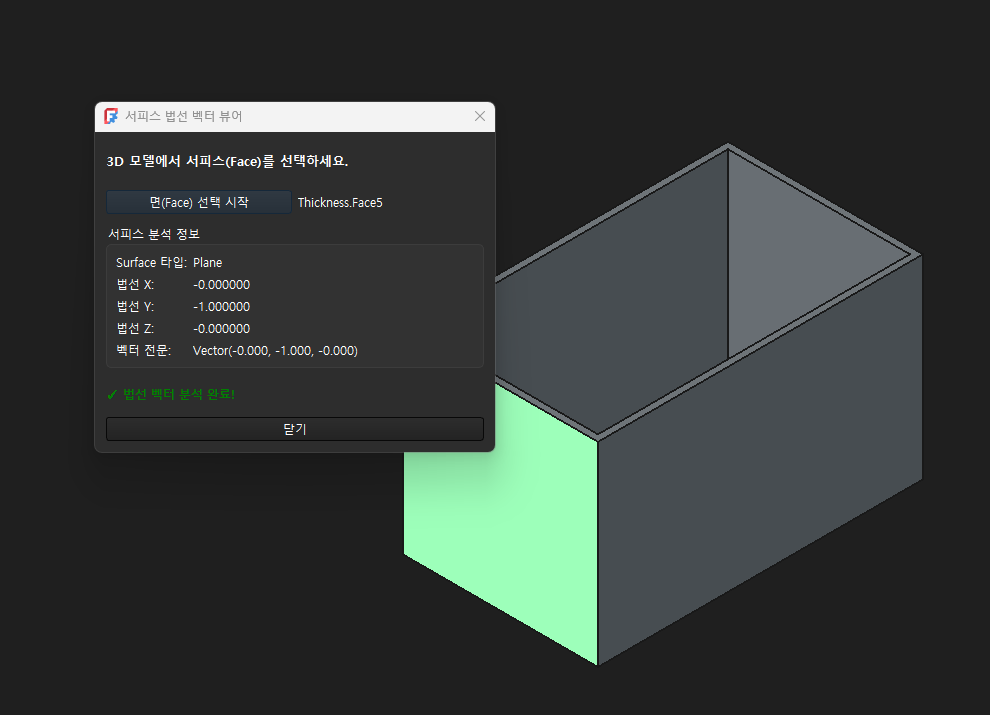
by korealionkk@gmail.com
반응형
'FreeCAD' 카테고리의 다른 글
| FreeCAD & Python] edge를 구성하는 것들은 무엇이 있는가? (0) | 2026.09.10 |
|---|---|
| FreeCAD & Python] 법선 벡터 값 활용 하기 (0) | 2026.09.08 |
| FreeCAD & Python]매크로를 이용한 Feature 라이브러리 프로그램 (0) | 2026.09.03 |
| FreeCAD & Python]매크로를 이용한 자동설계 프로그램 개발 과정 (0) | 2026.09.02 |
| FreeCAD & Python] Dimension change program (0) | 2026.08.29 |


