반응형

■ 파이썬으로 이미지 파일 관리
사진을 관리하고 검색하는 기능을 만들어 봅니다 특정 폴더에 이미지 파일을 저장합니다. DB에 파일 저장 경로 및 이름 및 사용자가 입력한 정보를 저장, 관리 합니다.
1. 이미지 분류 프로그램
이미지에서 인물이 포한된 것과 포함되지 않은 것을 구분해서 특정 폴도에 저장 합니다
아이폰 이미지
ㄴ 인물
ㄴ 사물
2. 이미지 분류 프로그램 UI
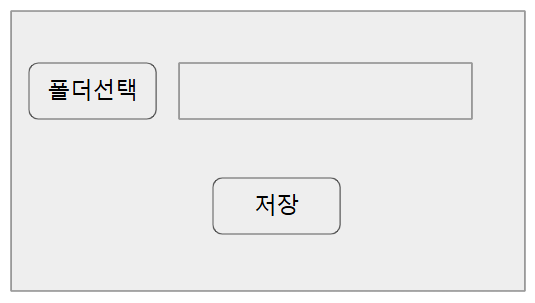
- 폴더 선택 : 아이폰 사진이 모여 있는 폴더 선택
- 저장 : 지정한 폴더에 이미지가 분류되어 저장
3. 프로그램 코드
사람의 얼굴을 인식하기 위해 가볍고 강력한 Haar Cascade 알고리즘을 사용합니다. 프로그램을 실행하기 전에 필수 라이브러리를 먼저 설치해 주세요.
| pip install opencv-python |
import os
import shutil
import threading
import tkinter as tk
from tkinter import filedialog, messagebox
import cv2

# 인물(얼굴) 인식을 위한 Haar Cascade 분류기 로드
face_cascade = cv2.CascadeClassifier(cv2.data.haarcascades + 'haarcascade_frontalface_default.xml')


def contains_human(image_path):
    """이미지에 인물(얼굴)이 포함되어 있는지 확인하는 함수"""
    try:
        img = cv2.imread(image_path)
        if img is None:
            return False

        gray = cv2.cvtColor(img, cv2.COLOR_BGR2GRAY)
        faces = face_cascade.detectMultiScale(gray, scaleFactor=1.1, minNeighbors=5, minSize=(30, 30))

        return len(faces) > 0
    except Exception as e:
        print(f"파일 처리 오류 ({image_path}): {e}")
        return False


def get_unique_path(target_path):
    """대상 경로에 같은 이름의 파일이 있으면 (1), (2)... 를 붙여 중복을 피한다"""
    if not os.path.exists(target_path):
        return target_path

    base, ext = os.path.splitext(target_path)
    counter = 1
    while True:
        new_path = f"{base}({counter}){ext}"
        if not os.path.exists(new_path):
            return new_path
        counter += 1


def select_folder():
    """[폴더선택] 버튼 클릭 시: 이미지가 모여 있는 원본 폴더 선택"""
    folder_selected = filedialog.askdirectory(title="이미지가 모여 있는 폴더 선택")
    if folder_selected:
        entry_path.delete(0, tk.END)
        entry_path.insert(0, folder_selected)


def start_classification():
    """[저장] 버튼 클릭 시: 별도 스레드에서 분류 작업 실행 (GUI 멈춤 방지)"""
    source_dir = entry_path.get()

    if not source_dir or not os.path.exists(source_dir):
        messagebox.showwarning("경고", "이미지가 모여 있는 폴더를 먼저 선택해주세요.")
        return

    # 작업 중 버튼 비활성화
    btn_save.config(state=tk.DISABLED)
    btn_select.config(state=tk.DISABLED)
    label_status.config(text="분류 작업 진행 중...")

    thread = threading.Thread(target=run_classification, args=(source_dir,), daemon=True)
    thread.start()


def run_classification(source_dir):
    """실제 분류/이동 작업 (백그라운드 스레드)"""
    base_target_dir = r"G:\아이폰 이미지"
    person_dir = os.path.join(base_target_dir, "인물")
    object_dir = os.path.join(base_target_dir, "사물")

    try:
        os.makedirs(person_dir, exist_ok=True)
        os.makedirs(object_dir, exist_ok=True)
    except Exception as e:
        root.after(0, lambda: finish_with_error(
            f"G:\\아이폰 이미지 폴더를 생성할 수 없습니다.\nG 드라이브가 연결되어 있는지 확인해주세요.\n({e})"
        ))
        return

    valid_extensions = ('.jpg', '.jpeg', '.png', '.bmp', '.webp')
    success_count = 0
    fail_count = 0

    try:
        filenames = os.listdir(source_dir)
    except Exception as e:
        root.after(0, lambda: finish_with_error(f"폴더를 읽을 수 없습니다.\n({e})"))
        return

    for filename in filenames:
        file_path = os.path.join(source_dir, filename)

        if os.path.isfile(file_path) and filename.lower().endswith(valid_extensions):
            try:
                if contains_human(file_path):
                    target_path = os.path.join(person_dir, filename)
                else:
                    target_path = os.path.join(object_dir, filename)

                target_path = get_unique_path(target_path)
                shutil.move(file_path, target_path)
                success_count += 1
            except Exception as e:
                print(f"이동 오류 ({filename}): {e}")
                fail_count += 1

    root.after(0, lambda: finish_classification(success_count, fail_count))


def finish_classification(success_count, fail_count):
    """작업 완료 후 UI 갱신 (메인 스레드에서 실행)"""
    btn_save.config(state=tk.NORMAL)
    btn_select.config(state=tk.NORMAL)
    label_status.config(text="대기 중")

    msg = f"총 {success_count}개의 이미지가 'G:\\아이폰 이미지' 폴더로 분류 저장되었습니다!"
    if fail_count > 0:
        msg += f"\n(이동 실패: {fail_count}개, 콘솔 로그 확인)"
    messagebox.showinfo("완료", msg)


def finish_with_error(message):
    """오류 발생 시 UI 갱신 (메인 스레드에서 실행)"""
    btn_save.config(state=tk.NORMAL)
    btn_select.config(state=tk.NORMAL)
    label_status.config(text="대기 중")
    messagebox.showerror("오류", message)


# --- UI 화면 구성 (Tkinter) ---
root = tk.Tk()
root.title("파이썬으로 이미지 파일 관리")
root.geometry("450x220")
root.resizable(False, False)
root.configure(bg="#F0F0F0")

# 상단: 폴더 선택 레이아웃
frame_top = tk.Frame(root, bg="#F0F0F0")
frame_top.pack(pady=30)

btn_select = tk.Button(frame_top, text="폴더선택", command=select_folder, width=10, height=1)
btn_select.pack(side=tk.LEFT, padx=10)

entry_path = tk.Entry(frame_top, width=35)
entry_path.pack(side=tk.LEFT, padx=5)

# 하단: 저장 버튼
btn_save = tk.Button(root, text="저장", command=start_classification, width=10, height=1)
btn_save.pack(pady=10)

# 상태 표시 레이블
label_status = tk.Label(root, text="대기 중", bg="#F0F0F0")
label_status.pack(pady=5)

root.mainloop()

📂 백그라운드 저장 결과 (G:\ 드라이브 구조)
코드가 실행되면서 지정한 G 드라이브 경로에 자동으로 다음과 같이 폴더가 트리가 생성되고 파일이 깔끔하게 정리됩니다
| G:\ (외장하드/USB 등) └── 📂 아이폰 이미지 ├── 📂 인물 │ ├── photo1.jpg │ ├── photo1(1).jpg <-- (중복 방지 코드 작동 예시) │ └── family.png └── 📂 사물 ├── desk.jpg └── travel_view.png |
by korealionkk@gmail.com
반응형
'업무 자동화 > python' 카테고리의 다른 글
| 이미지 관리 프로그램 # 2 (0) | 2026.06.14 |
|---|---|
| 아이폰 사진 속성 정보 가져오기 (0) | 2026.06.13 |
| Get dimensions from a Creo model #2 (1) | 2025.09.18 |
| Qt Designer 학습] 시그널 이란? (0) | 2025.09.10 |
| Qt Designer 학습] Property Editor의 속성 (1) | 2025.09.09 |


