반응형
■ 실행 결과
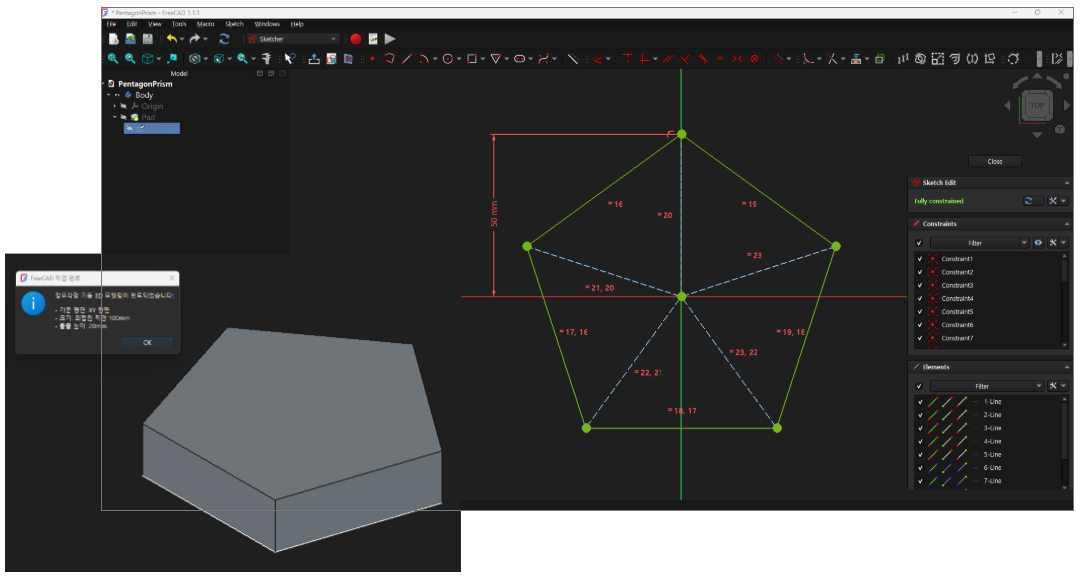
■ 코드
import FreeCAD as App
import FreeCADGui as Gui
import Part
import Sketcher
import math
from PySide6.QtWidgets import QMessageBox

# ==============================================================================
# 1. 새 문서 및 PartDesign Body 생성
# ==============================================================================
doc_name = "PentagonPrism"
doc = App.newDocument(doc_name)
Gui.activateWorkbench("PartDesignWorkbench")

body = doc.addObject("PartDesign::Body", "Body")
doc.recompute()

# ==============================================================================
# 2. Sketch 생성 및 XY 평면 매핑
# ==============================================================================
sketch = body.newObject("Sketcher::SketchObject", "Sketch")
origin = body.Origin
features = origin.OriginFeatures
xy_plane = None

for f in features:
    if "Plane" in f.TypeId and "XY" in f.Name.upper():
        xy_plane = f
        break

if xy_plane is None:
    for idx in [0, 3]:
        if idx < len(features) and "Plane" in features[idx].TypeId:
            xy_plane = features[idx]
            break

if xy_plane is None:
    raise RuntimeError("XY 평면을 찾을 수 없습니다.")

sketch.AttachmentSupport = [(xy_plane, '')]
sketch.MapMode = 'FlatFace'
doc.recompute()

# ==============================================================================
# 3. 직경 100 외접원 기반 정오각형 스케치 수동 생성
# ==============================================================================
r = 50.0
vertices = []

for i in range(5):
    angle = math.radians(90 + i * 72)
    x = r * math.cos(angle)
    y = r * math.sin(angle)
    vertices.append(App.Vector(x, y, 0.0))

# 3-1. 외곽 실선 5개 (지오메트리 0 ~ 4번)
for i in range(5):
    p_start = vertices[i]
    p_end   = vertices[(i + 1) % 5]
    sketch.addGeometry(Part.LineSegment(p_start, p_end), False)

# 3-2. 중심 → 꼭짓점 보조선 5개 (지오메트리 5 ~ 9번)
center = App.Vector(0.0, 0.0, 0.0)
for i in range(5):
    sketch.addGeometry(Part.LineSegment(center, vertices[i]), True)

# 3-3. 일치 구속 (Coincident)
for i in range(5):
    sketch.addConstraint(Sketcher.Constraint('Coincident', i, 2, (i + 1) % 5, 1))

for i in range(5):
    sketch.addConstraint(Sketcher.Constraint('Coincident', -1, 1, 5 + i, 1))

for i in range(5):
    sketch.addConstraint(Sketcher.Constraint('Coincident', 5 + i, 2, i, 1))

# 3-4. 동등 구속 (Equal)
for i in range(4):
    sketch.addConstraint(Sketcher.Constraint('Equal', i, i + 1))

for i in range(4):
    sketch.addConstraint(Sketcher.Constraint('Equal', 5 + i, 5 + i + 1))

# 3-5. 크기 구속: 보조선 길이를 50mm로 고정
# ※ 수정: 'Radius' → 'Distance' (선분에는 Distance 사용)
sketch.addConstraint(Sketcher.Constraint('Distance', 5, 50.0))

# 회전 방지: 첫 번째 꼭짓점을 Y축 위에 고정
sketch.addConstraint(Sketcher.Constraint('PointOnObject', 5, 2, -2))

doc.recompute()

# 구속 상태 출력 (ConstraintCount로 확인)
# ※ 수정: solve()는 반환값 없음
sketch.solve()
print(f"적용된 구속 수: {sketch.ConstraintCount}")

# ==============================================================================
# 4. 돌출 (Pad) — 높이 20mm
# ==============================================================================
pad = body.newObject("PartDesign::Pad", "Pad")
# ※ 수정: Profile은 스케치 객체를 직접 할당
pad.Profile = sketch
pad.Length = 20.0
pad.Midplane = False
pad.Reversed = False
doc.recompute()

# ==============================================================================
# 5. ISO 뷰 정렬 및 전체 맞춤
# ==============================================================================
view = Gui.activeDocument().activeView()
view.viewIsometric()
view.fitAll()
print("오각형 기둥 생성 완료.")

# ==============================================================================
# 6. 완료 알림 메시지 창
# ==============================================================================
main_window = Gui.getMainWindow()
msg_box = QMessageBox(main_window)
msg_box.setIcon(QMessageBox.Information)
msg_box.setWindowTitle("FreeCAD 작업 완료")
msg_box.setText("정오각형 기둥 3D 모델링이 완료되었습니다!")
msg_box.setInformativeText(
    "- 기준 평면: XY 평면\n"
    "- 크기: 외접원 직경 100mm\n"
    "- 돌출 높이: 20mm"
)
msg_box.setStandardButtons(QMessageBox.Ok)
msg_box.show()
AI가 스케치 구속조건을 완벽히 구현 하고있습니다.
by korealionkk@gmail.com
반응형
'업무 자동화 > FreeCAD' 카테고리의 다른 글
| 자전거 뼈대 만들기 (0) | 2026.05.22 |
|---|---|
| Python] 유튜브 동영상을 이해 하고 코드를 만들수 있을까? (0) | 2026.05.22 |
| Python] 스케치 모드의 기능 제약 (0) | 2026.05.22 |
| Python] 치수가 있는 스케치 이미지로 사각기둥 만들기 (1) | 2026.05.21 |
| 모델링 연습 (0) | 2026.05.21 |


