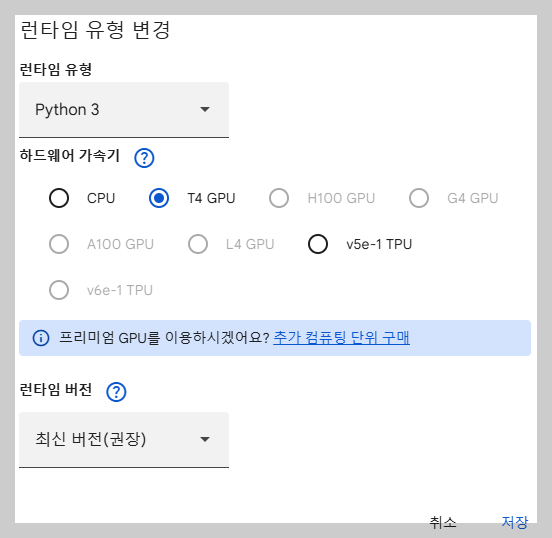
1. 런타임 유형 변경

구글의 GPU를 선택 합니다.
2. 데이터 불러오기 실행
import tensorflow as tf
from keras import layers, models
import matplotlib.pyplot as plt
import tensorflow_datasets as tfds

# 데이터셋 로드 (이미지 크기는 150x150으로 조정)
(train_data, test_data), info = tfds.load(
    'cats_vs_dogs',
    split=['train[:80%]', 'train[80%:]'],
    with_info=True,
    as_supervised=True
)
↓
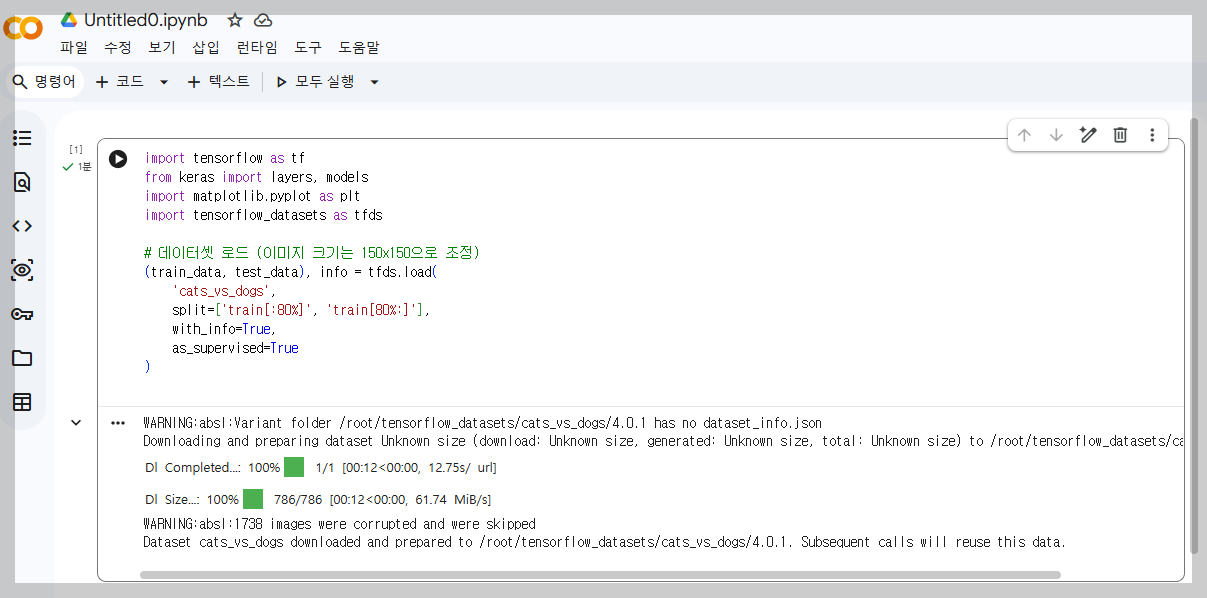
실행 결과 메세지를 설명 합니다
| WARNING:absl:Variant folder /root/tensorflow_datasets/cats_vs_dogs/4.0.1 has no dataset_info.json Downloading and preparing dataset Unknown size (download: Unknown size, generated: Unknown size, total: Unknown size) to /root/tensorflow_datasets/cats_vs_dogs/4.0.1... |
위 내용은 오류가 아니라 아주 정상적인 진행 과정입니다. "여기 데이터가 없네? 내가 지금 인터넷에서 가져와서 준비해둘게. 잠시만 기다려줘!"라는 의미 입니다.
WARNING:absl:Variant folder /root/tensorflow_datasets/cats_vs_dogs/4.0.1 has no dataset_info.json
|
Downloading and preparing dataset Unknown size (download: Unknown size, generated: Unknown size, total: Unknown size)
|
to /root/tensorflow_datasets/cats_vs_dogs/4.0.1...
|
이 메시지는 데이터 준비가 최종적으로 완료되었음을 알려주는 메시지입니다.
| WARNING:absl:1738 images were corrupted and were skipped Dataset cats_vs_dogs downloaded and prepared to /root/tensorflow_datasets/cats_vs_dogs/4.0.1. Subsequent calls will reuse this data. |
WARNING:absl:1738 images were corrupted and were skipped
|
Dataset cats_vs_dogs downloaded and prepared to /root/tensorflow_datasets/cats_vs_dogs/4.0.1.
|
Subsequent calls will reuse this data.
|
3. 불러온 데이터 확인 하기
1) 데이터셋 정보 요약 보기 (info 객체 활용)
# 전체 이미지 개수와 라벨 종류 확인
print(f"전체 데이터 정보: {info.features}")
print(f"라벨 이름: {info.features['label'].names}") # ['cat', 'dog'] 출력
print(f"훈련 데이터 개수: {info.splits['train'].num_examples}")
↓
| 전체 데이터 정보: FeaturesDict({ 'image': Image(shape=(None, None, 3), dtype=uint8), 'image/filename': Text(shape=(), dtype=string), 'label': ClassLabel(shape=(), dtype=int64, num_classes=2), }) 라벨 이름: ['cat', 'dog'] 훈련 데이터 개수: 23262 |
2) 실제 이미지와 라벨 시각화 (가장 추천)
# 훈련 데이터에서 5개만 가져와서 출력
plt.figure(figsize=(10, 10))
for i, (image, label) in enumerate(train_data.take(5)):
    ax = plt.subplot(1, 5, i + 1)
    plt.imshow(image)
    plt.title(info.features['label'].int2str(label)) # 숫자로 된 라벨을 문자열로 변환
    plt.axis("off")
↓

3) 데이터 텐서 구조 확인
# 데이터 한 개를 추출해서 속성 확인
for image, label in train_data.take(1):
    print("이미지 형태(Height, Width, Channel):", image.shape)
    print("라벨 값:", label.numpy()) # 0(고양이) 또는 1(개)
↓
| 이미지 형태(Height, Width, Channel): (262, 350, 3) 라벨 값: 1 |
by korealionkk@gmail.com
'업무 자동화 > AI' 카테고리의 다른 글
| '개와 고양이 분류' 실습 #3 (0) | 2026.05.15 |
|---|---|
| '개와 고양이 분류' 실습 #2 (0) | 2026.05.14 |
| '개와 고양이 분류' 프로젝트 #3 - 이미지 데이터 전처리 (0) | 2026.05.13 |
| '개와 고양이 분류' 프로젝트 #2 - 이미지 데이터셋 읽어오기 (0) | 2026.05.13 |
| '개와 고양이 분류' 프로젝트 #1 (0) | 2026.05.13 |


