참고 자료
초보자를 위해 . . . . . session
■ Creo와 엑셀 연결 확인 코드 (Test Script)설정이 정상인지 확인하기 위해 아래 코드를 VBA 모듈에 붙여넣고 실행해 보세요.Dim asynconn As New pfcls.CCpfcAsyncConnection Dim conn As pfcls.IpfcAsyncConnection Dim session
tool-2020.tistory.com
아래 VB API 코드는 Creo Parametric과 연결하여, 하드디스크에 있는 특정 모델(my_part.prt)을 세션에 로드하고, 새 창에 열어 모델의 정보를 메세지 창으로 출력하는 과정을 보여줍니다.

| Sub RetrieveModelExample() '// 1. 연결 설정 Dim asynconn As New pfcls.CCpfcAsyncConnection Dim conn As pfcls.IpfcAsyncConnection Dim oSession As pfcls.IpfcBaseSession Dim Model As IpfcModel Dim Window As IpfcWindow Set conn = asynconn.Connect("", "", ".", 5) Set oSession = conn.Session '// 2. 디스크립터 생성 - 파일 이름으로 Dim oNewModelDescriptor As New CCpfcModelDescriptor Dim oModelDescriptor As IpfcModelDescriptor Set oModelDescriptor = oNewModelDescriptor.CreateFromFileName("my_part.prt") '// 3. RetrieveModel - 세션에 로드 (창 없음) Set Model = oSession.RetrieveModel(oModelDescriptor) MsgBox "RetrieveModel 완료: " & Model.FileName '// 4. OpenFile - 창과 함께 열기 Set Window = oSession.OpenFile(oModelDescriptor) Set Model = Window.Model '// 5. 창 활성화 Window.Activate '// 6. 모델 정보 출력 MsgBox "모델 이름: " & Model.InstanceName MsgBox "파일 이름: " & Model.FileName MsgBox "저장 위치: " & Model.Origin MsgBox "수정 여부: " & Model.IsModified '// 7. Creo 연결 종료 conn.Disconnect (2) End Sub |
■ 프로그램 흐름 요약
| Connect() ← Creo 연결 ↓ CreateFromFileName("my_part.prt") ← 디스크립터 생성 ↓ RetrieveModel() ← 세션에 로드 (창 없음) ↓ OpenFile() → Window.Activate ← 창 열고 활성화 ↓ model.Origin / InstanceName 등 ← 모델 정보 확인 ↓ Disconnect() ← 연결 종료 |
1. 연결 설정:
- pfcls.CCpfcAsyncConnection 및 pfcls.IpfcAsyncConnection 객체를 사용하여 Creo Parametric과의 비동기 연결을 설정합니다.
- conn.Connect("", "", ".", 5)를 통해 Creo에 연결합니다.
2. 디스크립터 생성:
- CCpfcModelDescriptor 및 IpfcModelDescriptor 객체를 사용하여 모델에 대한 정보를 정의합니다.
- oNewModelDescriptor.CreateFromFileName("my_part.prt")를 사용하여 "my_part.prt" 파일 이름으로 디스크립터를 생성합니다.
디스크립터는 모델의 "주민등록증" 같은 역할로, 모델이 세션에 없더라도 그 모델을 특정하고 참조하는 데 사용됩니다.
3. RetrieveModel - 세션에 로드:
- oSession.RetrieveModel(oModelDescriptor)를 사용하여 생성된 디스크립터를 기반으로 "my_part.prt" 모델을 Creo 세션에 로드합니다. 이때 모델은 메모리에만 로드되고 Creo 창에는 표시되지 않습니다.
- MsgBox를 사용하여 RetrieveModel 완료 메시지와 로드된 모델의 인스턴스 이름을 표시합니다.
4. OpenFile - 창과 함께 열기:
- oSession.OpenFile(oModelDescriptor)를 사용하여 생성된 디스크립터를 기반으로 "my_part.prt" 모델을 새 창에 엽니다. 이때 모델은 Creo 창에 표시됩니다.
- Set Model = Window.Model을 사용하여 새 창에 열린 모델에 대한 참조를 가져옵니다.
5. 창 활성화:
- Window.Activate를 사용하여 새 창을 활성화합니다.
6. 모델 정보 출력:
- MsgBox를 사용하여 활성화된 모델의 이름, 파일 이름, 저장 위치, 수정 여부 정보를 표시합니다.
7. Creo 연결 종료:
- conn.Disconnect (2)를 사용하여 Creo Parametric과의 연결을 종료합니다.
■ IpfcBaseSession, IpfcModel, IpfcWindow 관계
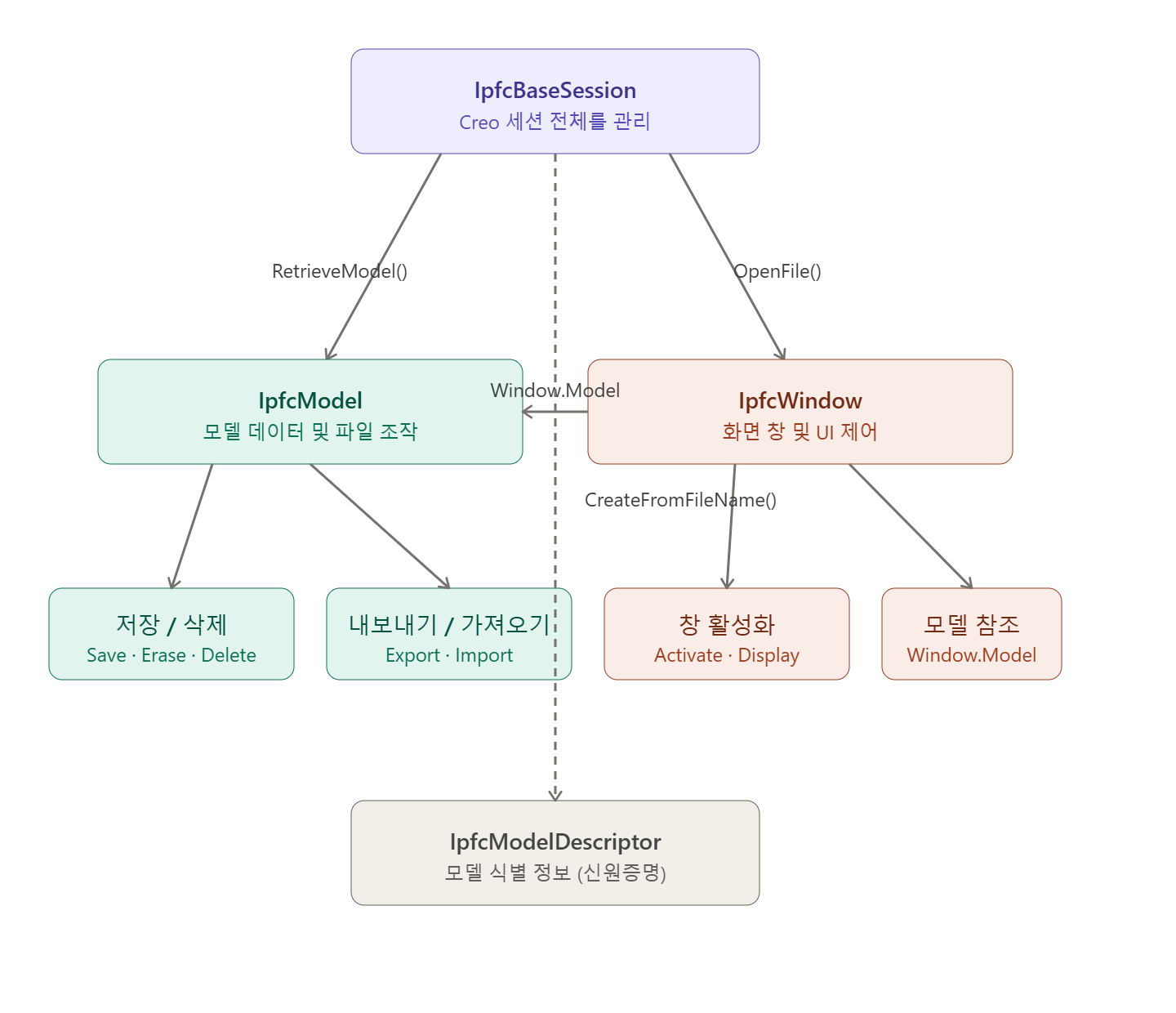
IpfcBaseSession — 모든 것의 출발점입니다. Creo 전체 세션을 관리하며, 모델을 불러오거나 파일을 여는 진입점입니다.
- RetrieveModel() → IpfcModel 반환 (창 없이 메모리에만 로드)
- OpenFile() → IpfcWindow 반환 (창과 함께 열기)
IpfcModel — 모델 그 자체입니다. 파일 저장/삭제/이름변경/내보내기 등 모델 데이터를 직접 조작합니다. 창(Window)과는 독립적으로 존재할 수 있습니다.
IpfcWindow — 화면에 열린 창입니다. Window.Model 속성으로 창 안에 표시된 IpfcModel에 접근할 수 있습니다.
IpfcModelDescriptor — 모델의 신원 정보입니다. 세 객체 모두에서 모델을 식별하는 용도로 사용됩니다.
예시 코드
| ' 패턴 1: 창 없이 조용히(?) 세션으로만 로드 Set Model = oSession.RetrieveModel(descr) ' → IpfcModel 직접 ' 패턴 2: 창과 함께 열고 모델 참조 Set Window = oSession.OpenFile(descr) ' → IpfcWindow Set Model = Window.Model ' → IpfcModel 참조 Window.Activate ' 창 활성화 ( Creo 화면에 표시) |
IpfcBaseSession에 정의된 변수이름으로, 기능 RetrieveModel(oModelDescriptor)를 사용하여, IpfcModel의 변수 이름으로 정의된 것에 "전달" 합니다. 이것을 객체지향 프로그램 이라 합니다. 점 표기법은 객체지향 프로그래밍에서 객체의 내부 멤버에 접근하는 방식입니다.
| conn.Session ─┬── ──┬─── │ └─ 속성(Property) 또는 메서드(Method) └─ 객체(Object) |
' 속성(Property) 접근 — 값을 읽거나 쓸 때
Set oSession = conn.Session ' conn의 Session 속성 읽기
model.IsModified = True ' model의 IsModified 속성 쓰기
' 메서드(Method) 호출 — 동작을 실행할 때
oSession.RetrieveModel(descr) ' oSession의 RetrieveModel 실행
model.Save() ' model의 Save 실행
Window.Activate ' Window의 Activate 실행
' 체이닝(Chaining) — 연속으로 접근할 때
Set model = Window.Model ' Window → Model 속성
MsgBox model.FileName ' model → FileName 속성
by korealionkk@gmail.com
'업무 자동화 > VBA, VB.NET For Creo' 카테고리의 다른 글
| 초보자를 위해 . . . . IpfcBaseSession 환경설정 기능 (0) | 2026.05.04 |
|---|---|
| 초보자를 위해 . . . . IpfcBaseSession 세션에 로드된 모델을 찾기 (0) | 2026.05.04 |
| 초보자를 위해 . . . . 모델의 Parameter 값 가져오기 (0) | 2026.05.02 |
| 초보자를 위해 . . . Creo 파일을 Session(메모리)으로 가져오기 (0) | 2026.04.30 |
| 초보자를 위해 . . . . . Creo VBA API 설정 추가 자료 (0) | 2026.04.30 |


