반응형
The script connects to Creo via Creoson, retrieves all features (including unnamed ones) from the currently active model, prints their name, type, and ID, and then disconnects.
this script’s process (connect → get features → print → disconnect)?
▣ Python code :
import creopyson
import json

# Connect to the Creoson server
client = creopyson.Client()
client.connect()

# Retrieve the feature list of the currently active model
features = client.feature_list(
    file_=None,  # Use the currently active model
    inc_unnamed=True  # Include unnamed features
)

# Output feature names
print("List the model's features:")
for feature in features:
    print(f"Feature Name: {feature.get('name', 'Unnamed')}, Type: {feature['type']}, ID: {feature['feat_id']}")

# Close the connection
client.disconnect()
| Feature name | creo model |
| List the model's features: Feature Name: RIGHT, Type: DATUM PLANE, ID: 1 Feature Name: TOP, Type: DATUM PLANE, ID: 3 Feature Name: FRONT, Type: DATUM PLANE, ID: 5 Feature Name: 축, Type: GROUP HEAD, ID: 19185 Feature Name: X, Type: DATUM AXIS, ID: 46 Feature Name: Y, Type: DATUM AXIS, ID: 39 Feature Name: Z, Type: DATUM AXIS, ID: 50 Feature Name: ORG, Type: COORDINATE SYSTEM, ID: 7 Feature Name: , Type: PROTRUSION, ID: 19417 Feature Name: , Type: ROUND, ID: 19440 Feature Name: , Type: CHAMFER, ID: 19536 |
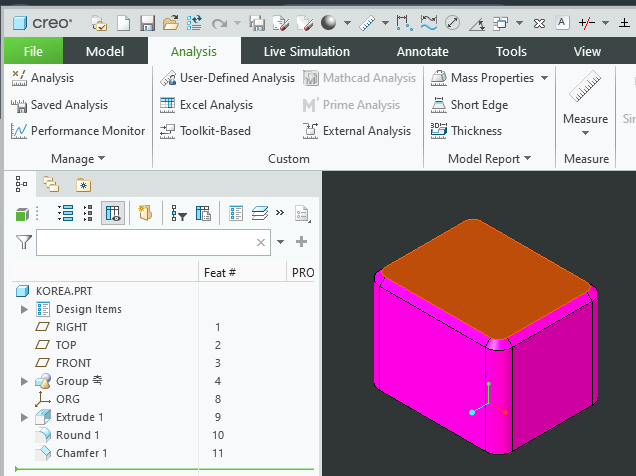 |
Extrude1, round1, chamfer1 are not user-defined feature names.
by korealionkk@gmail.com

반응형
'업무 자동화 > python & CAD' 카테고리의 다른 글
| Python 학습] 가상환경 설정 (0) | 2025.09.08 |
|---|---|
| Get dimensions from a Creo model #1 (0) | 2025.09.07 |
| Creo & Python] Get the parameter name of the model (0) | 2025.09.05 |
| Creo & Python] Get creo file name (0) | 2025.09.05 |
| CREOSON-Creo 9기준] 설치 및 환경 설정 (0) | 2025.09.04 |


