반응형
▣ 로그인 프로그램
이 프로그램은 Python의 customtkinter GUI 라이브러리를 사용하여 데스크톱용 로그인 시스템을 구축한 것입니다.
주요 기능은 다음과 같습니다.
- 사용자 인터페이스: 이메일 주소와 비밀번호를 입력할 수 있는 깔끔한 로그인 화면을 제공합니다.
- 데이터베이스 연동: psycopg2를 통해 PostgreSQL 데이터베이스에 연결하여 사용자 계정 정보를 확인합니다.
- 보안: bcrypt 라이브러리를 사용하여 사용자의 비밀번호를 안전하게 해시 처리하고 검증합니다.
- 로그인/회원가입: 올바른 이메일과 비밀번호를 입력하면 로그인에 성공하고, 환영 창이 나타납니다. '회원 가입' 버튼을 누르면 별도의 스크립트를 실행하여 회원 가입 절차를 진행합니다.
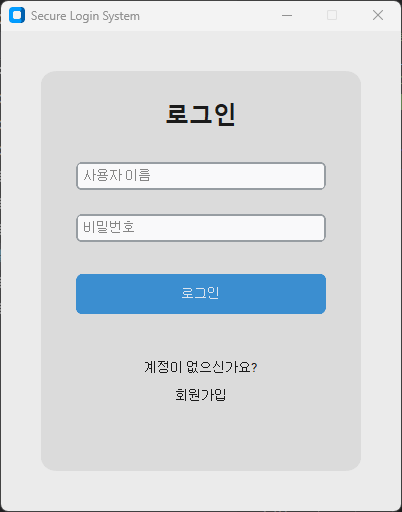
메일 주소와 비번을 입력하고 로그인 버튼을 클릭하면, "welcome" 메세지를 출력하는 window 창을 표시 합니다.
▣ 로그인 프로그램 코드
import customtkinter as ctk
import psycopg2
from tkinter import messagebox
import bcrypt
import os

# --- 데이터베이스 연결 정보 ---
DB_NAME = "user_accounts"
DB_USER = "designer"
DB_PASSWORD = "7777"
DB_HOST = "localhost"
DB_PORT = "5432"

# --- 데이터베이스 헬퍼 함수 ---
def get_db_connection():
    try:
        conn = psycopg2.connect(
            dbname=DB_NAME,
            user=DB_USER,
            password=DB_PASSWORD,
            host=DB_HOST,
            port=DB_PORT,
        )
        return conn
    except psycopg2.OperationalError as e:
        messagebox.showerror("Database Connection Error", f"데이터베이스 연결에 실패했습니다: {e}")
        return None

# --- 로그인 창 클래스 ---
class LoginApp(ctk.CTk):
    def __init__(self):
        super().__init__()

        # --- 창 설정 ---
        self.title("Secure Login System")
        self.geometry("400x500")
        self.resizable(False, False)
        ctk.set_appearance_mode("System")
        ctk.set_default_color_theme("blue")

        # --- 메인 프레임 ---
        self.main_frame = ctk.CTkFrame(self, corner_radius=15)
        self.main_frame.pack(pady=40, padx=40, fill="both", expand=True)

        # --- 위젯 생성 ---
        self.create_widgets()

    def create_widgets(self):
        # 제목 레이블
        title_label = ctk.CTkLabel(self.main_frame, text="로그인", font=ctk.CTkFont(size=24, weight="bold"))
        title_label.pack(pady=(30, 20))

        # 이메일 입력 필드
        self.email_entry = ctk.CTkEntry(self.main_frame, width=250, placeholder_text="이메일 주소")
        self.email_entry.pack(pady=12, padx=10)

        # 비밀번호 입력 필드
        self.password_entry = ctk.CTkEntry(self.main_frame, width=250, placeholder_text="비밀번호", show="*")
        self.password_entry.pack(pady=12, padx=10)

        # 로그인 버튼
        login_button = ctk.CTkButton(self.main_frame, text="로그인", command=self.login_event, width=250, height=40)
        login_button.pack(pady=20, padx=10)

        # 회원 가입 텍스트 및 버튼
        signup_frame = ctk.CTkFrame(self.main_frame)
        signup_frame.pack(pady=5)
        signup_label = ctk.CTkLabel(signup_frame, text="회원이 아니신가요?", font=ctk.CTkFont(size=12))
        signup_label.pack(side=ctk.LEFT, padx=5)
        signup_button = ctk.CTkButton(signup_frame, text="회원 가입", command=self.open_signup, width=100, height=30)
        signup_button.pack(side=ctk.LEFT, padx=5)

    def open_signup(self):
        # "user_account.py" 실행
        try:
            os.system("python user_account.py")
        except Exception as e:
            messagebox.showerror("오류", f"회원 가입 스크립트 실행 중 오류가 발생했습니다: {e}")

    def login_event(self):
        email = self.email_entry.get()
        password = self.password_entry.get()

        if not email or not password:
            messagebox.showwarning("입력 오류", "이메일과 비밀번호를 모두 입력해주세요.")
            return

        conn = get_db_connection()
        if conn is None:
            return

        try:
            with conn.cursor() as cur:
                # 사용자 정보 조회
                cur.execute("SELECT password_hash, salt FROM users WHERE email = %s", (email,))
                result = cur.fetchone()

                if result:
                    stored_hash, salt = result
                    # memoryview를 bytes로 변환
                    stored_hash_bytes = bytes(stored_hash)
                    salt_bytes = bytes(salt)
                    if bcrypt.checkpw(password.encode('utf-8'), stored_hash_bytes):
                        # 로그인 성공 시 새 창 열기
                        self.show_welcome_window(email)
                    else:
                        messagebox.showerror("로그인 실패", "잘못된 비밀번호입니다.")
                else:
                    messagebox.showerror("로그인 실패", "등록되지 않은 이메일입니다.")

        except Exception as e:
            messagebox.showerror("오류", f"로그인 중 오류가 발생했습니다: {e}")
        finally:
            if conn:
                conn.close()

    def show_welcome_window(self, email):
        # 기존 창 닫기
        self.destroy()

        # 새 환영 창
        welcome_app = ctk.CTk()
        welcome_app.title("Welcome")
        welcome_app.geometry("400x200")
        welcome_app.resizable(False, False)
        ctk.set_appearance_mode("System")
        ctk.set_default_color_theme("blue")

        welcome_frame = ctk.CTkFrame(welcome_app, corner_radius=15)
        welcome_frame.pack(pady=40, padx=40, fill="both", expand=True)

        welcome_label = ctk.CTkLabel(welcome_frame, text=f"Welcome, {email}!", font=ctk.CTkFont(size=16, weight="bold"))
        welcome_label.pack(pady=50)

        welcome_app.mainloop()

# --- 애플리케이션 실행 ---
if __name__ == "__main__":
    app = LoginApp()
    app.mainloop()
by korealionkk@gmail.com

반응형
'업무 자동화 > python & CAD' 카테고리의 다른 글
| Python 학습] 데이터베이스 테이블 만들기 (0) | 2025.08.19 |
|---|---|
| Python 학습] 주식 종목 이름 가져오기 #1 (1) | 2025.08.18 |
| Python 학습] 로그인 프로그램 - 사용자 계정 (1) | 2025.08.17 |
| Python 학습] 선택한 폴더안에 있는 asm 파일 이름 가져오기 (1) | 2025.08.16 |
| Python 학습] 초보자를 위한 프로그램 (1) | 2025.08.16 |


