반응형
▣ 파워포인트를 구성하는 슬라이드 총 수량 가져오기
from pptx import Presentation

# PPTX 파일 경로
ppt_path = r"G:\02 Python\PythonTest03\pptform.pptx"

# 프레젠테이션 불러오기
prs = Presentation(ppt_path)

# 슬라이드 개수 구하기
slide_count = len(prs.slides)

print(f"총 슬라이드 개수: {slide_count}")
프로그램 실행 결과

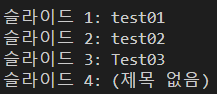
▣ 파워포인트를 구성하는 슬라이드 총 수량 및 이름 가져오기
from pptx import Presentation

# PPTX 파일 경로
ppt_path = r"G:\02 Python\PythonTest03\pptform.pptx"

# 프레젠테이션 불러오기
prs = Presentation(ppt_path)

# 슬라이드 개수 출력
print(f"총 슬라이드 개수: {len(prs.slides)}\n")

# 슬라이드 번호 및 제목 출력
for i, slide in enumerate(prs.slides, start=1):
    title = None
    # 슬라이드에서 제목(Title) 찾아오기
    for shape in slide.shapes:
        if shape.has_text_frame:
            # 일반적으로 첫 번째 텍스트가 제목일 확률이 높음
            title = shape.text.strip()
            break
    if not title:
        title = "(제목 없음)"
    print(f"슬라이드 {i}: {title}")
프로그램 실행 결과
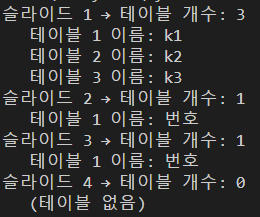
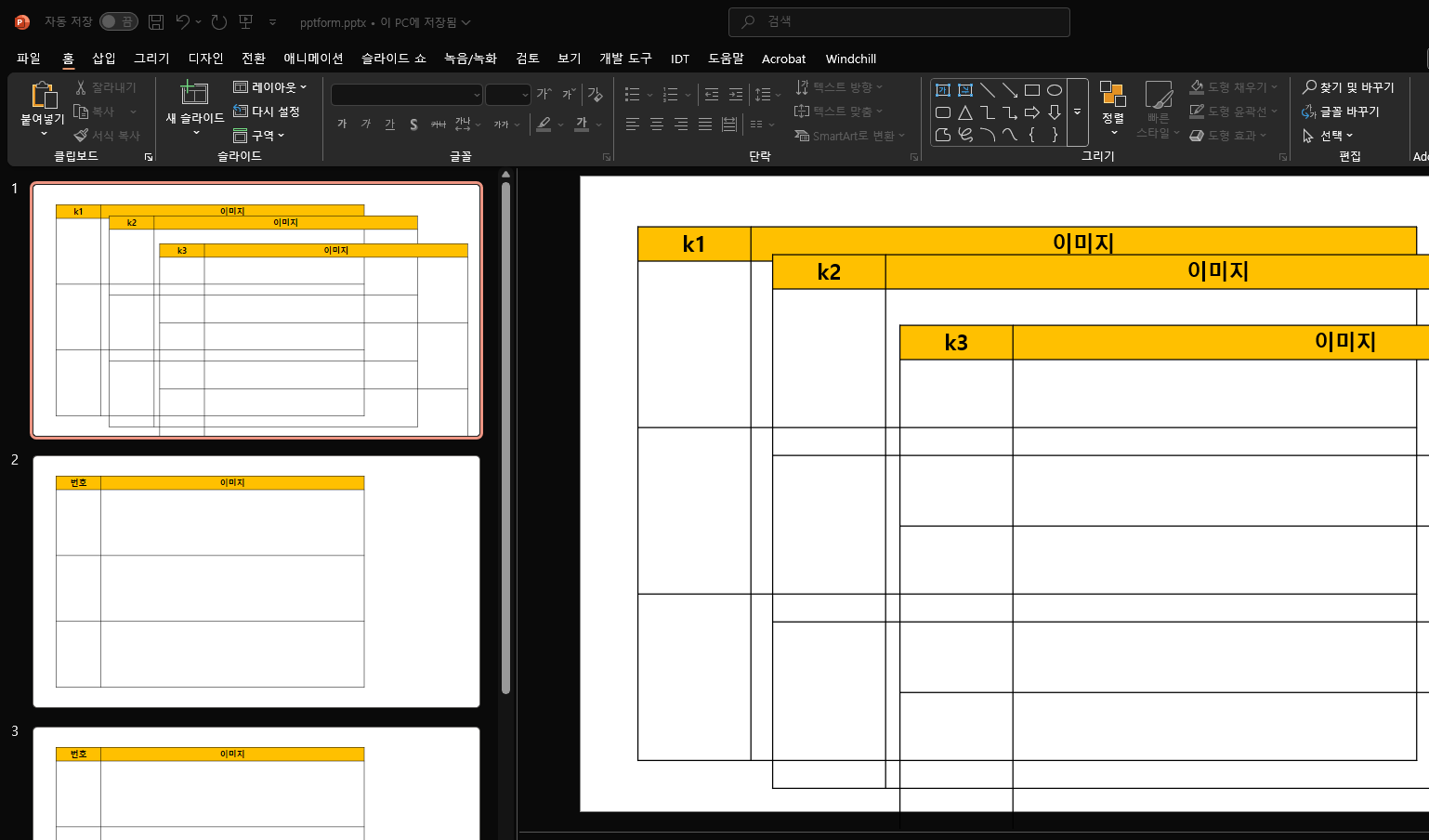
▣ 파워포인트를 구성하는 슬라이드 총 수량 및 테이블 이름 및 수량 가져오기
from pptx import Presentation

# PPTX 파일 경로
ppt_path = r"G:\02 Python\PythonTest03\pptform.pptx"

# 프레젠테이션 불러오기
prs = Presentation(ppt_path)

# 전체 슬라이드 반복
for slide_idx, slide in enumerate(prs.slides, start=1):
    table_count = 0
    table_names = []

    for shape in slide.shapes:
        # 테이블인지 확인
        if shape.has_table:
            table_count += 1
            table = shape.table

            # 첫 번째 셀 내용 가져오기 (테이블 이름 용도로 사용)
            first_cell_text = table.cell(0, 0).text.strip() if table.cell(0, 0).text else "(빈 셀)"
            table_names.append(first_cell_text)

    print(f"슬라이드 {slide_idx} → 테이블 개수: {table_count}")
    if table_names:
        for idx, name in enumerate(table_names, start=1):
            print(f"   테이블 {idx} 이름: {name}")
    else:
print(" (테이블 없음)")| 프로그램 실행 결과 | 파워포인트 화면 |
 |
 |
▣ 파워포인트를 구성하는 테이블에 번호 및 문자를 입력
이번에는 각 테이블의 2행부터 마지막 행까지 순차적인 입력을 하는 코드
- 1열 → 순차 번호 입력 (1, 2, 3, ...)
- 2열 → "korea-" + 번호 형식으로 입력
from pptx import Presentation

# PPTX 파일 경로
ppt_path = r"G:\02 Python\PythonTest03\pptform.pptx"

# 프레젠테이션 불러오기
prs = Presentation(ppt_path)

# 모든 슬라이드 순회
for slide in prs.slides:
    for shape in slide.shapes:
        if shape.has_table:
            table = shape.table
            rows = len(table.rows)
            cols = len(table.columns)

            # 최소 2열 이상, 2행 이상 있어야 처리 가능
            if rows >= 2 and cols >= 2:
                # 2행부터 시작해서 마지막 행까지 번호 매김
                num = 1
                for r in range(1, rows):  # 1 → 2행부터 시작
                    table.cell(r, 0).text = str(num)                # 1열에 번호
                    table.cell(r, 1).text = f"korea-{num}"           # 2열에 korea-번호
                    num += 1

# 변경사항 저장
output_path = r"G:\02 Python\PythonTest03\pptform_modified.pptx"
prs.save(output_path)

print(f"모든 테이블 수정 완료! → {output_path}")
프로그램 실행 결과

by korealionkk@gmail.com

반응형
'업무 자동화 > python & CAD' 카테고리의 다른 글
| Python 학습] 파이썬 코드를 실행파일 exe로 만드는 방법 (2) | 2025.08.15 |
|---|---|
| Python 학습] 파이썬 GUI 배우기 - 커스텀 티킨터(CustomTkinter) (3) | 2025.08.15 |
| Python 학습] 엑셀 파일에 이미지를 삽입 (4) | 2025.08.13 |
| Python 학습] 변수 ,자료형 . . . . (4) | 2025.08.13 |
| Creopyson 라이브러 #1 (1) | 2025.08.12 |


