업무 자동화/python & CAD
Python 학습] 주식 종목 이름 가져오기 #3
ToolBOX01
2025. 8. 19. 18:12
반응형
▣ .csv 파일의 종목코드 입력하기
Python에서 psycopg2와 customtkinter 라이브러리를 사용해 CSV 파일에서 주식 데이터를 읽어 PostgreSQL 데이터베이스에 저장하는 GUI 애플리케이션을 구현한 것입니다.

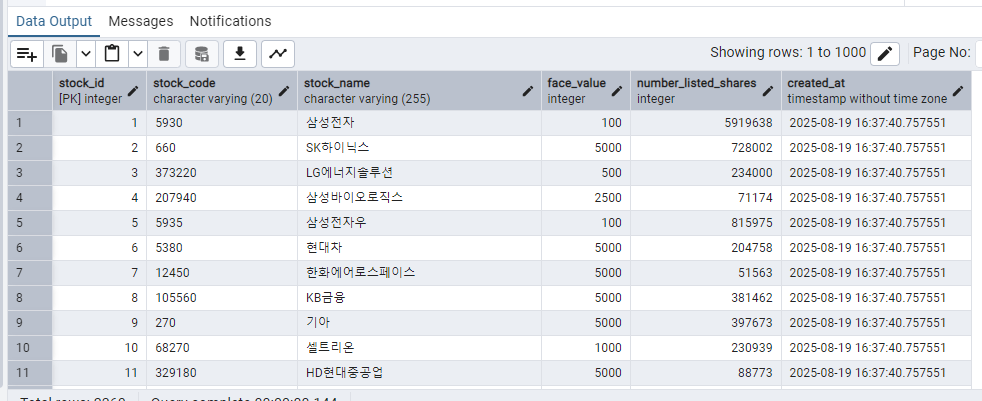
사용자가 CSV 파일에서 주식 코드(stock_code)와 주식명(stock_name)을 포함한 데이터를 선택해 PostgreSQL 데이터베이스의 stock_name 테이블에 저장하거나 업데이트하는 GUI 애플리케이션.
▣ .csv 파일 입력 코드
주요 기능:
- CSV 파일 선택 및 데이터 로드.
- 로드된 데이터를 GUI에 표시.
- 데이터를 PostgreSQL 데이터베이스에 저장 또는 업데이트.
import psycopg2
from psycopg2 import Error
import customtkinter as ctk
import tkinter as tk
from tkinter import filedialog, messagebox
import csv

# Database connection details
DB_HOST = "localhost"
DB_PORT = "5432"
DB_NAME = "user_accounts"
DB_USER = "designer"
DB_PASSWORD = "7777"

class StockApp:
    def __init__(self, root):
        self.root = root
        self.root.title("Stock Data Importer")
        self.root.geometry("600x400")
        ctk.set_appearance_mode("System")
        ctk.set_default_color_theme("blue")

        # CSV data storage
        self.csv_data = []

        # GUI elements
        self.label = ctk.CTkLabel(root, text="Select a CSV file to import stock data", font=("Arial", 14))
        self.label.pack(pady=10)

        self.select_button = ctk.CTkButton(root, text="Select CSV File", command=self.load_csv)
        self.select_button.pack(pady=10)

        self.text_area = ctk.CTkTextbox(root, width=500, height=200)
        self.text_area.pack(pady=10)

        self.save_button = ctk.CTkButton(root, text="Save to Database", command=self.save_to_db, state="disabled")
        self.save_button.pack(pady=10)

    def load_csv(self):
        file_path = filedialog.askopenfilename(filetypes=[("CSV files", "*.csv")])
        if file_path:
            self.csv_data = []
            encodings = ['utf-8', 'cp949']  # Try UTF-8 first, then CP949 for Korean
            loaded = False
            for encoding in encodings:
                try:
                    with open(file_path, newline='', encoding=encoding) as csvfile:
                        reader = csv.DictReader(csvfile)
                        # Check for valid column names (with or without spaces)
                        fieldnames = [col.strip() for col in reader.fieldnames] if reader.fieldnames else []

                        has_code = any(col in fieldnames for col in ['종목 코드', '종목코드', 'stock_code'])
                        has_name = any(col in fieldnames for col in ['종목명', 'stock_name'])

                        if not has_code or not has_name:
                            messagebox.showerror("Error", "CSV must contain '종목 코드' or '종목코드' and '종목명' or 'stock_name' columns")
                            return

                        self.text_area.delete("1.0", tk.END)
                        self.text_area.insert(tk.END, "Stock Code | Stock Name\n" + "-"*50 + "\n")

                        code_col = next((col for col in ['종목 코드', '종목코드', 'stock_code'] if col in fieldnames), None)
                        name_col = next((col for col in ['종목명', 'stock_name'] if col in fieldnames), None)

                        for row in reader:
                            stock_code = row.get(code_col, '').strip()
                            stock_name = row.get(name_col, '').strip()
                            if stock_code and stock_name:
                                self.csv_data.append((stock_code, stock_name))
                                self.text_area.insert(tk.END, f"{stock_code} | {stock_name}\n")
                        self.save_button.configure(state="normal")
                        loaded = True
                        break
                except UnicodeDecodeError:
                    continue
                except Exception as e:
                    messagebox.showerror("Error", f"Failed to read CSV: {str(e)}")
                    return
            if not loaded:
                messagebox.showerror("Error", "Failed to read CSV: Unable to decode with supported encodings (utf-8, cp949)")
                return

    def save_to_db(self):
        connection = None
        try:
            # Establish database connection
            connection = psycopg2.connect(
                host=DB_HOST,
                port=DB_PORT,
                database=DB_NAME,
                user=DB_USER,
                password=DB_PASSWORD
            )
            cursor = connection.cursor()

            # Prepare for batch operations
            inserted_count = 0
            updated_count = 0

            for stock_code, stock_name in self.csv_data:
                # Check if the stock_name already exists in the database
                cursor.execute("SELECT stock_code FROM stock_name WHERE stock_name = %s", (stock_name,))
                result = cursor.fetchone()

                if result:
                    # If stock_name exists, update the stock_code if it's different
                    existing_code = result[0]
                    if existing_code != stock_code:
                        cursor.execute("UPDATE stock_name SET stock_code = %s WHERE stock_name = %s", (stock_code, stock_name))
                        updated_count += 1
                else:
                    # If stock_name does not exist, insert the new entry
                    cursor.execute("INSERT INTO stock_name (stock_code, stock_name) VALUES (%s, %s)", (stock_code, stock_name))
                    inserted_count += 1

            connection.commit()

            total_changes = inserted_count + updated_count
            if total_changes > 0:
                messagebox.showinfo("Success", f"{inserted_count} new entries saved and {updated_count} existing entries updated successfully!")
            else:
                messagebox.showinfo("Info", "No new data to add or update. All entries already exist in the database.")

            self.save_button.configure(state="disabled")
            self.text_area.delete("1.0", tk.END)
            self.csv_data = []

        except (Exception, Error) as error:
            messagebox.showerror("Error", f"Failed to save to database: {str(error)}")
            if connection:
                connection.rollback()
        finally:
            if connection:
                cursor.close()
                connection.close()

if __name__ == "__main__":
    root = ctk.CTk()
    app = StockApp(root)
    root.mainloop()
▣ 테이블 입력 내용
by korealionkk@gmail.com
반응형