업무 자동화/python & CAD
Python 학습] 선택한 폴더안에 있는 asm 파일 이름 가져오기
ToolBOX01
2025. 8. 16. 11:56
반응형
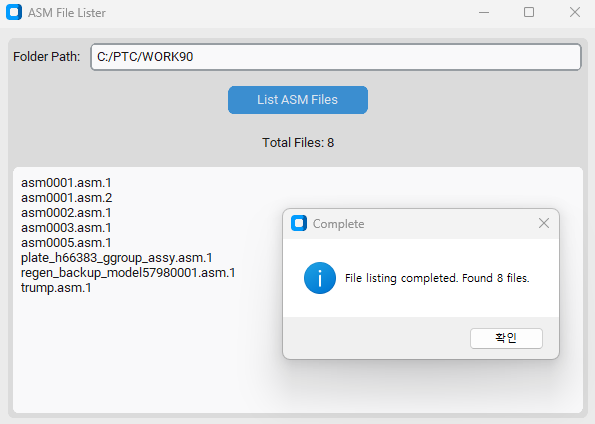
▣ 프로그램 실행 화면
이 프로그램은 Python의 tkinter와 customtkinter 라이브러리를 사용하여 ASM (어셈블리) 파일의 목록을 확인하고 표시하는 간단한 GUI 애플리케이션입니다. 사용자 친화적인 인터페이스를 통해 특정 폴더 내의 .asm 파일을 찾아 그 목록과 총 개수를 보여줍니다.
주요 기능
- 폴더 선택:
- List ASM Files 버튼을 클릭하면, 파일 탐색기 창이 열려 사용자가 원하는 폴더를 선택할 수 있게 합니다.
- 선택한 폴더의 경로는 상단의 텍스트 입력란에 자동으로 채워집니다.
- ASM 파일 검색:
- 선택한 폴더 내의 모든 파일을 탐색합니다.
- list_files 함수는 특정 조건을 만족하는 파일을 찾아 리스트에 추가합니다. 이 프로그램의 경우, 파일 이름이 .asm으로 끝나거나, .asm. 문자열을 포함하고 있으며 마지막 확장자가 숫자인 파일(.asm.1, .asm.2 등)을 찾습니다.
- 이 조건을 만족하는 파일의 전체 개수가 계산됩니다.
- 결과 표시:
- 검색이 완료되면, 찾은 파일의 목록이 하단의 큰 텍스트 상자에 나열됩니다.
- 텍스트 상자 위에는 발견된 파일의 총 개수가 업데이트됩니다.
- 모든 작업이 끝나면, 발견된 파일 수를 포함하는 완료 메시지가 팝업으로 나타나 사용자에게 알립니다.
▣ 프로그램 코드
import os
import tkinter as tk
from tkinter import messagebox, filedialog
import customtkinter as ctk
from pathlib import Path

class AsmFileListerApp:
    def __init__(self, root):
        self.root = root
        self.root.title("ASM File Lister")
        self.root.geometry("600x400")

        # Set appearance mode and theme
        ctk.set_appearance_mode("System")
        ctk.set_default_color_theme("blue")

        # Create main frame
        self.main_frame = ctk.CTkFrame(root)
        self.main_frame.grid(row=0, column=0, sticky="nsew", padx=10, pady=10)
        self.root.grid_rowconfigure(0, weight=1)
        self.root.grid_columnconfigure(0, weight=1)

        # Folder path entry
        self.path_label = ctk.CTkLabel(self.main_frame, text="Folder Path:")
        self.path_label.grid(row=0, column=0, padx=5, pady=5, sticky="w")

        self.path_entry = ctk.CTkEntry(self.main_frame, width=400)
        self.path_entry.grid(row=0, column=1, padx=5, pady=5, sticky="ew")

        # List files button
        self.list_button = ctk.CTkButton(self.main_frame, text="List ASM Files", command=self.list_files)
        self.list_button.grid(row=1, column=0, columnspan=2, pady=10)

        # File count label
        self.count_label = ctk.CTkLabel(self.main_frame, text="Total Files: 0")
        self.count_label.grid(row=2, column=0, columnspan=2, pady=5)

        # File list text area
        self.file_list = ctk.CTkTextbox(self.main_frame, width=500, height=200)
        self.file_list.grid(row=3, column=0, columnspan=2, padx=5, pady=5, sticky="nsew")
        self.main_frame.grid_rowconfigure(3, weight=1)
        self.main_frame.grid_columnconfigure(1, weight=1)

    def list_files(self):
        # Open folder browser
        folder_path = filedialog.askdirectory(title="Select Folder")
        if not folder_path:
            return

        # Update the entry field with the selected path
        self.path_entry.delete(0, tk.END)
        self.path_entry.insert(0, folder_path)

        # Clear previous content
        self.file_list.delete("1.0", tk.END)
        self.count_label.configure(text="Total Files: 0")

        # Check if folder exists
        if not os.path.isdir(folder_path):
            messagebox.showerror("Error", "Specified folder does not exist.")
            return

        # List .asm files
        file_count = 0
        file_list = []

        try:
            for file in os.listdir(folder_path):
                # Check for .asm extension or files containing .asm.
                if (file.upper().endswith(".ASM") or
                    (".asm." in file.lower() and file[:file.rindex(".")].upper().endswith(".ASM"))):
                    # Get the extension after the last "."
                    extension = file[file.rindex("."):].lower()
                    # Check if the extension is numeric (e.g., ".1", ".2") and not alphabetic
                    if extension[1:].isdigit():
                        file_list.append(file)
                        file_count += 1

            # Update UI
            self.file_list.insert(tk.END, "\n".join(file_list))
            self.count_label.configure(text=f"Total Files: {file_count}")

            # Show completion message
            messagebox.showinfo("Complete", f"File listing completed. Found {file_count} files.")

        except Exception as e:
            messagebox.showerror("Error", f"An error occurred: {str(e)}")

if __name__ == "__main__":
    ctk.set_appearance_mode("System")
    root = ctk.CTk()
    app = AsmFileListerApp(root)
    root.mainloop()
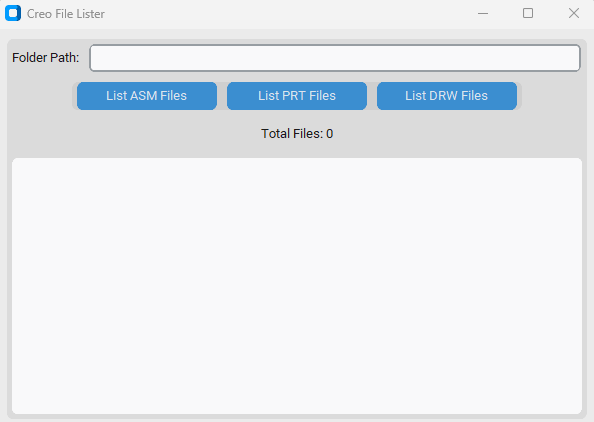
▣ Creo 파일 리스트 프로그램 실행 화면
CustomTkinter 라이브러리를 사용하여 만든 데스크톱 애플리케이션으로, 특정 확장자를 가진 파일을 찾아 목록으로 보여주는 기능을 수행합니다.
주요 기능
- 폴더 선택: "List ASM Files", "List PRT Files", "List DRW Files" 버튼을 누르면 파일 대화 상자가 나타나 원하는 폴더를 선택할 수 있습니다.
- 파일 목록 표시: 선택한 폴더 내에서 .asm, .prt, .drw 확장자를 가진 파일들을 자동으로 찾아 'File list' 텍스트 상자에 목록으로 보여줍니다.
- 버전 파일 검색: 기본 확장자(.asm, .prt, .drw)뿐만 아니라, 숫자 확장자(.1~.1000)가 붙은 파일까지 모두 검색합니다. 예를 들어, part.prt는 물론 part.prt.1이나 part.prt.123과 같은 파일도 찾아줍니다.
- 파일 개수 표시: 검색이 완료되면 'Total Files' 레이블에 찾은 파일의 총 개수를 표시해 줍니다.
- 알림 메시지: 파일 검색이 끝나면 메시지 박스를 통해 완료 여부와 찾은 파일 수를 알려줍니다.
- 간결한 인터페이스: 경로 입력 창, 3개의 버튼, 파일 개수 표시 레이블, 그리고 목록을 보여주는 텍스트 상자로 구성되어 사용하기 쉽습니다.
▣ Creo 파일 리스트 프로그램 코드
import os
import tkinter as tk
from tkinter import messagebox, filedialog
import customtkinter as ctk
import re # re 모듈 추가

class AsmFileListerApp:
    def __init__(self, root):
        self.root = root
        self.root.title("Creo File Lister")
        self.root.geometry("600x400")

        # Set appearance mode and theme
        ctk.set_appearance_mode("System")
        ctk.set_default_color_theme("blue")

        # Create main frame
        self.main_frame = ctk.CTkFrame(root)
        self.main_frame.grid(row=0, column=0, sticky="nsew", padx=10, pady=10)
        self.root.grid_rowconfigure(0, weight=1)
        self.root.grid_columnconfigure(0, weight=1)

        # Folder path entry
        self.path_label = ctk.CTkLabel(self.main_frame, text="Folder Path:")
        self.path_label.grid(row=0, column=0, padx=5, pady=5, sticky="w")

        self.path_entry = ctk.CTkEntry(self.main_frame, width=400)
        self.path_entry.grid(row=0, column=1, padx=5, pady=5, sticky="ew")

        # New frame for horizontal buttons
        self.button_frame = ctk.CTkFrame(self.main_frame)
        self.button_frame.grid(row=1, column=0, columnspan=2, pady=5)

        # List files buttons
        self.list_asm_button = ctk.CTkButton(self.button_frame, text="List ASM Files", command=self.list_asm_files)
        self.list_asm_button.grid(row=0, column=0, padx=5)

        self.list_prt_button = ctk.CTkButton(self.button_frame, text="List PRT Files", command=self.list_prt_files)
        self.list_prt_button.grid(row=0, column=1, padx=5)

        self.list_drw_button = ctk.CTkButton(self.button_frame, text="List DRW Files", command=self.list_drw_files)
        self.list_drw_button.grid(row=0, column=2, padx=5)

        # File count label
        self.count_label = ctk.CTkLabel(self.main_frame, text="Total Files: 0")
        self.count_label.grid(row=2, column=0, columnspan=2, pady=5)

        # File list text area
        self.file_list = ctk.CTkTextbox(self.main_frame, width=500, height=200)
        self.file_list.grid(row=3, column=0, columnspan=2, padx=5, pady=5, sticky="nsew")
        self.main_frame.grid_rowconfigure(3, weight=1)
        self.main_frame.grid_columnconfigure(1, weight=1)

    def _list_files_with_extension(self, extension):
        """특정 확장자와 그 번호가 1000 이하인 파일을 찾는 공통 함수"""
        folder_path = filedialog.askdirectory(title="Select Folder")
        if not folder_path:
            return

        self.path_entry.delete(0, tk.END)
        self.path_entry.insert(0, folder_path)

        self.file_list.delete("1.0", tk.END)
        self.count_label.configure(text="Total Files: 0")

        if not os.path.isdir(folder_path):
            messagebox.showerror("Error", "Specified folder does not exist.")
            return

        file_count = 0
        file_list = []

        # 정규 표현식 패턴 정의
        # 예: .asm$ -> .asm으로 끝나는 파일
        # 예: .asm.([1-9]|[1-9][0-9]{1,2}|1000)$ -> .asm.1부터 .asm.1000까지
        pattern = re.compile(f"^{re.escape(extension)}$|{re.escape(extension)}\\.([1-9]|[1-9][0-9]{1,2}|1000)$", re.IGNORECASE)

        try:
            for file in os.listdir(folder_path):
                # 패턴과 일치하는지 확인
                if pattern.search(file):
                    file_list.append(file)
                    file_count += 1

            self.file_list.insert(tk.END, "\n".join(file_list))
            self.count_label.configure(text=f"Total Files: {file_count}")
            messagebox.showinfo("Complete", f"{extension.upper()} file listing completed. Found {file_count} files.")

        except Exception as e:
            messagebox.showerror("Error", f"An error occurred: {str(e)}")

    def list_asm_files(self):
        self._list_files_with_extension(".asm")

    def list_prt_files(self):
        self._list_files_with_extension(".prt")

    def list_drw_files(self):
        self._list_files_with_extension(".drw")

if __name__ == "__main__":
    ctk.set_appearance_mode("System")
    root = ctk.CTk()
    app = AsmFileListerApp(root)
    root.mainloop()
프로그램 다운로드
* 바이러스를 꼭 체크 하십시요. 사용의 책임은 사용자에 있습니다.
by korealionkk@gmail.com

반응형