업무 자동화/PostgreSQL
PostgreSQL] VBA로 데이터 베이스 읽기 쓰기 #4
ToolBOX01
2025. 8. 1. 18:10
반응형
▣ VBA로 데이터 베이스 테이블에 데이터 쓰기
PostgreSQL 데이터베이스에 VBA를 사용하여 테이블에 데이터를 쓰기 위해서는 ADO(ActiveX Data Objects)를 통해 ODBC 드라이버로 연결하는 방법을 사용합니다.
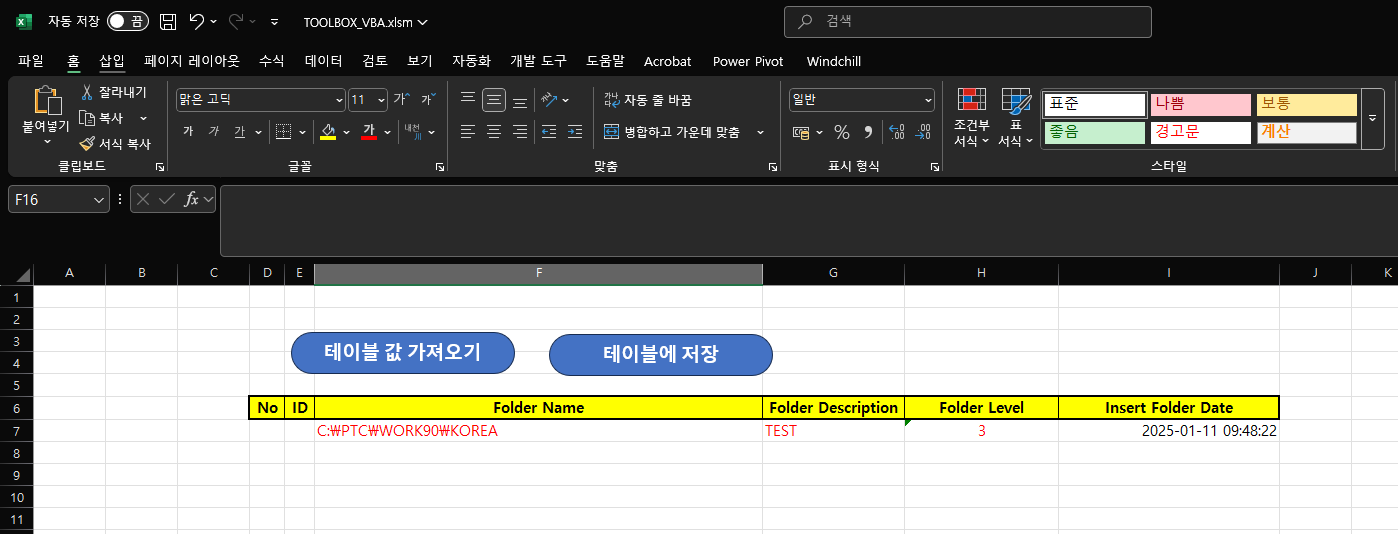
다음과 같이 액셀에 입력 합니다.
코드
Sub AddDataFromExcelToPostgreSQL()
    Dim conn As Object
    Dim sqlQuery As String
    Dim connectionString As String
    Dim ws As Worksheet

    ' 워크시트 설정
    Set ws = ThisWorkbook.ActiveSheet

    ' PostgreSQL ODBC 연결 문자열
    connectionString = "Driver={PostgreSQL Unicode(x64)};" & _
                       "Server=localhost;" & _
                       "Port=5432;" & _
                       "Database=creomodel01;" & _
                       "Uid=designer;" & _
                       "Pwd=7777;" ' 실제 비밀번호로 대체하세요

    ' ADO Connection 객체 생성
    Set conn = CreateObject("ADODB.Connection")

    On Error GoTo ErrorHandler

    ' 데이터베이스 연결
    conn.connectionString = connectionString
    conn.Open

    ' 셀 값 가져오기 (F7: folder_name, G7: folder_description, H7: folder_level)
    Dim folderName As String
    Dim folderDescription As String
    Dim folderLevel As Integer

    folderName = ws.Cells(7, "F").Value
    folderDescription = ws.Cells(7, "G").Value
    folderLevel = CInt(ws.Cells(7, "H").Value)

    ' 새로운 데이터 추가 쿼리
    sqlQuery = "INSERT INTO ""DesignTeam"".""creo_folder01"" (folder_name, folder_description, folder_level, insert_folder_date) " & _
               "VALUES ('" & Replace(folderName, "'", "''") & "', '" & Replace(folderDescription, "'", "''") & "', " & folderLevel & ", CURRENT_TIMESTAMP)"

    ' 쿼리 실행
    conn.Execute sqlQuery

    MsgBox "데이터가 성공적으로 추가되었습니다!", vbInformation, "성공"

    ' 리소스 정리
    conn.Close
    Set conn = Nothing
    Set ws = Nothing
    Exit Sub

ErrorHandler:
    Debug.Print "Error Number: " & Err.Number & ", Description: " & Err.Description
    MsgBox "데이터 추가 실패: " & Err.Description & vbCrLf & "자세한 내용은 디버그 창을 확인하세요.", vbCritical, "오류"
    If Not conn Is Nothing Then
        If conn.State = 1 Then conn.Close
    End If
    Set conn = Nothing
    Set ws = Nothing
End Sub
id와 Insert Folder Date 값은 자동으로 입력 됩니다. 위 프로그램은 AI를 사용하여 만들었습니다.
이미지와 함께 요청 사항을 입력하면, 프로그램을 생성해 줍니다. Excel의 기본기능, VBA 기본 코드 학습, PostgreSQL의 기본 기능을 학습은 반드시 필요 합니다
▣ VBA로 데이터 베이스 테이블에 데이터 업데이트 하기
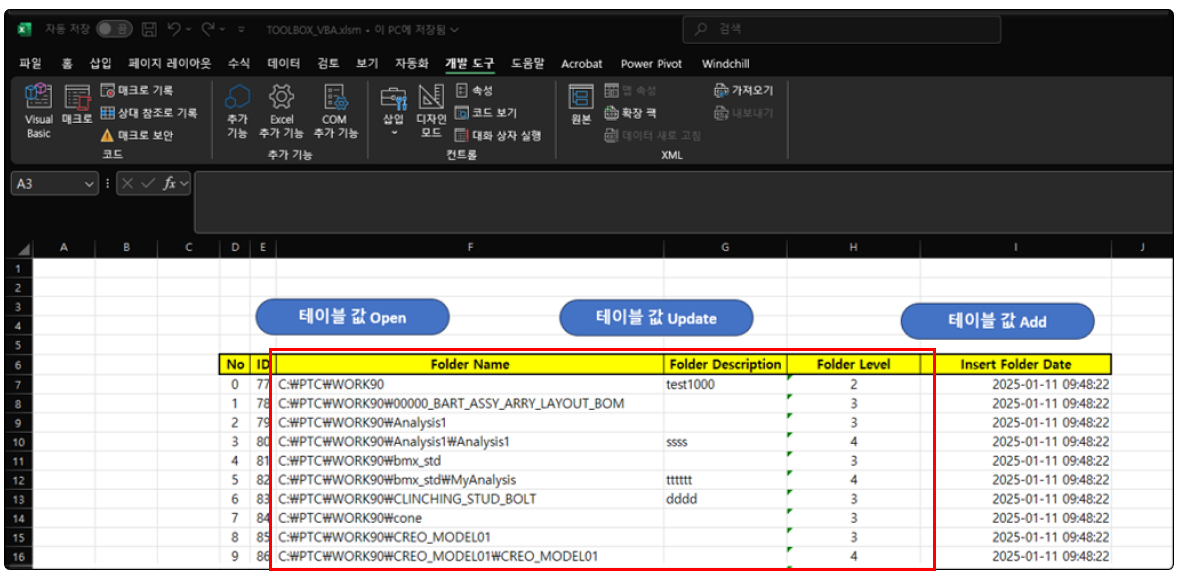
데이터베이스 테이블 값과 비교하여, 변경된 내용을 업데이트 합니다. "Folder Name", "Folder Description", "Folder Level"만 변경할 수 있습니다.
Sub UpdateTableDataToPostgreSQL()
    Dim conn As Object
    Dim connectionString As String
    Dim rs As Object
    Dim sqlQuery As String
    Dim ws As Worksheet
    Dim lastRow As Long
    Dim currentRow As Long
    Dim id As Long
    Dim affectedRows As Long

    ' 현재 활성 시트를 사용
    Set ws = ActiveSheet
    lastRow = ws.Cells(ws.Rows.Count, "E").End(xlUp).row

    ' PostgreSQL ODBC 연결 문자열
    connectionString = "Driver={PostgreSQL Unicode(x64)};" & _
                      "Server=localhost;" & _
                      "Port=5432;" & _
                      "Database=creomodel01;" & _
                      "Uid=designer;" & _
                      "Pwd=7777;" ' 실제 비밀번호로 대체하세요

    ' ADO Connection 및 Recordset 객체 생성
    Set conn = CreateObject("ADODB.Connection")
    Set rs = CreateObject("ADODB.Recordset")

    On Error GoTo ErrorHandler

    ' 데이터베이스 연결
    conn.Open connectionString

    ' 데이터 범위(F7:I) 내에서 비교 및 업데이트
    For currentRow = 7 To lastRow
        id = ws.Cells(currentRow, "E").Value

        ' 현재 행의 데이터를 테이블에서 조회
        sqlQuery = "SELECT folder_name, folder_description, folder_level FROM ""DesignTeam"".""creo_folder01"" WHERE id = " & id
        rs.Open sqlQuery, conn

        If Not rs.EOF Then
            ' 엑셀 값과 테이블 값 비교
            If rs("folder_name") <> ws.Cells(currentRow, "F").Value Or _
               rs("folder_description") <> ws.Cells(currentRow, "G").Value Or _
               CStr(rs("folder_level")) <> CStr(ws.Cells(currentRow, "H").Value) Then

                ' 값이 다를 경우 업데이트 쿼리 실행
                sqlQuery = "UPDATE ""DesignTeam"".""creo_folder01"" " & _
                          "SET folder_name = '" & Replace(ws.Cells(currentRow, "F").Value, "'", "''") & "', " & _
                          "folder_description = '" & Replace(ws.Cells(currentRow, "G").Value, "'", "''") & "', " & _
                          "folder_level = " & ws.Cells(currentRow, "H").Value & " " & _
                          "WHERE id = " & id

                conn.Execute sqlQuery, affectedRows
                Debug.Print "Updated Row " & currentRow & " (ID: " & id & "), Affected Rows: " & affectedRows
            End If
        End If
        rs.Close
    Next currentRow

    MsgBox "데이터 비교 및 업데이트가 완료되었습니다!", vbInformation, "완료"

    ' 리소스 정리
    If conn.State = 1 Then conn.Close
    Set rs = Nothing
    Set conn = Nothing
    Set ws = Nothing
    Exit Sub

ErrorHandler:
    Debug.Print "Error Number: " & Err.Number & ", Description: " & Err.Description
    MsgBox "데이터 업데이트 실패: " & Err.Description & vbCrLf & "자세한 내용은 디버그 창을 확인하세요.", vbCritical, "오류"
    If Not rs Is Nothing Then rs.Close
    If conn.State = 1 Then conn.Close
    Set rs = Nothing
    Set conn = Nothing
    Set ws = Nothing
End Sub
by korealionkk@gmail.com

반응형