업무 자동화/VBA, VB.NET For Creo
치수 값을 자동으로 대입 하여, 모델 면적 표시하기
ToolBOX01
2021. 3. 30. 18:04
반응형
Changing the model with multiple dimension values
Template 모델에서 변경하고자 하는 치수들을 읽어 모델을 변경 합니다. 면적을 구하는 Feature를 생성하고,
면적 매개변수 값을 표시 합니다.
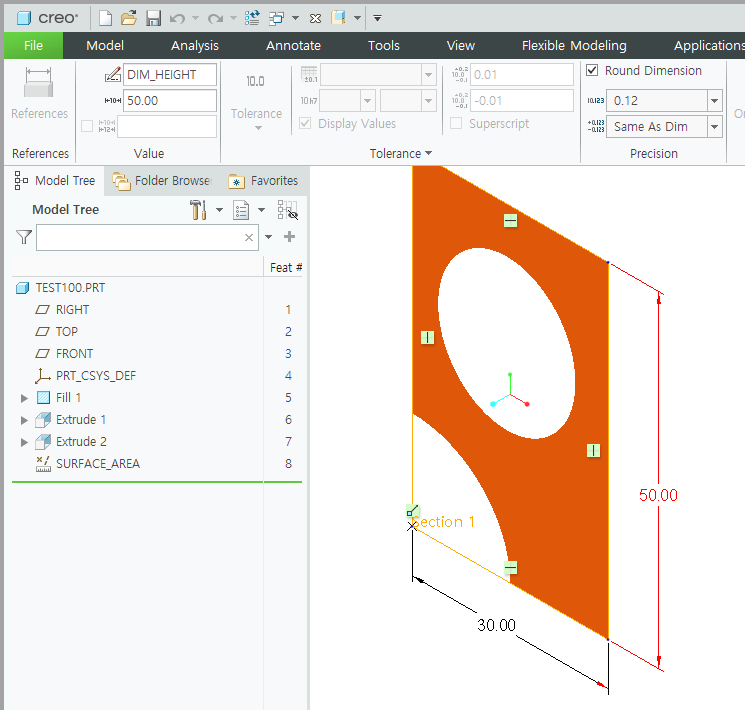
surface_area_creo60.prt.1
0.15MB
Dimension List의 dim_width , dim_height 값을 입력 합니다.
프로그램이 자동으로 Creo 모델에 치수값을 대입 합니다
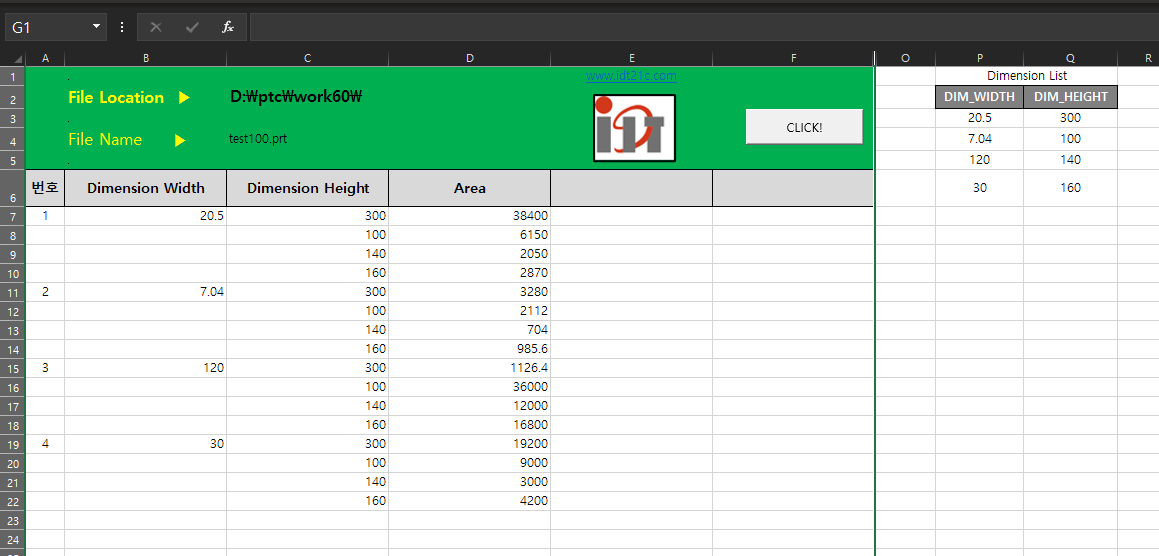
dimension model change v1.xlsm
0.03MB
프로그램 소스
Sub Dimension_Modify()
        Dim asynconn As New pfcls.CCpfcAsyncConnection
        Dim conn As pfcls.IpfcAsyncConnection
        Dim session As pfcls.IpfcBaseSession

    On Error GoTo RunError
        Set conn = asynconn.Connect("", "", ".", 5)
        Set session = conn.session

        Dim model As IpfcModel
        Set model = session.CurrentModel

        'Cells 초기화
        Range(Cells(7, "A"), Cells(Rows.Count, "A")).EntireRow.Delete

        'Model File location
        Cells(2, "c").Select
        Selection.ClearContents
        Cells(2, "c") = session.GetCurrentDirectory

        'Model File Name
        Cells(4, "c").Select
        Selection.ClearContents
        Cells(4, "c") = model.Filename


        Dim Solid As IpfcSolid
        Set Solid = model
        Dim Modelowner As IpfcModelItemOwner
        Set Modelowner = Solid

        'Dimension Parameter 정의
        Dim Dimwidth As IpfcBaseDimension
        Set Dimwidth = Modelowner.GetItemByName(EpfcModelItemType.EpfcITEM_DIMENSION, "DIM_WIDTH")
        Dim DimwidthCount As Integer
        DimwidthCount = Range("p3", Range("p3").End(xlDown)).Rows.Count

        Dim Dimheight As IpfcBaseDimension
        Set Dimheight = Modelowner.GetItemByName(EpfcModelItemType.EpfcITEM_DIMENSION, "DIM_HEIGHT")
        Dim DimheightCount As Integer
        DimheightCount = Range("q3", Range("q3").End(xlDown)).Rows.Count

        'SET Regenerate
        Dim RegenInstructions As New CCpfcRegenInstructions
        Dim Instrs As IpfcRegenInstructions
        Set Instrs = RegenInstructions.Create(True, True, Nothing)
        Call session.SetConfigOption("regen_failure_handling", "resolve_mode")

        'Window Repaint
        Dim window As pfcls.IpfcWindow
        Set window = session.CurrentWindow


        'Surface_Area Feaure Parameter
        Dim ModelItemOwner As IpfcModelItemOwner
        Set ModelItemOwner = session.CurrentModel
        Dim Featureitem As IpfcModelItem
        Set Featureitem = ModelItemOwner.GetItemByName(EpfcModelItemType.EpfcITEM_FEATURE, "SURFACE_AREA")

        Dim Powner As pfcls.IpfcParameterOwner
        Set Powner = Featureitem
        Dim Param As IpfcParameter
        Set Param = Powner.GetParam("AREA")
        Dim Paramname As IpfcBaseParameter
        Set Paramname = Param
        Dim ParamValue As IpfcParamValue


        Dim j As Integer
        j = 0

        For i = 0 To DimwidthCount - 1
            Dimwidth.DimValue = Cells(i + 3, "p")
            Cells(j + 7, "b") = Dimwidth.DimValue
            Cells(j + 7, "a") = i + 1

                For k = 0 To DimheightCount - 1
                    Dimheight.DimValue = Cells(k + 3, "q")
                    Cells(j + 7 + k, "c") = Dimheight.DimValue
                    Set ParamValue = Paramname.Value
                    Cells(j + 7 + k, "d") = ParamValue.DoubleValue
                    Call Solid.Regenerate(Instrs)
                    Call Solid.Regenerate(Instrs)
                    Call window.Activate
                    Call window.Repaint


                 Next k
             j = j + k
        Next i

        Call session.SetConfigOption("regen_failure_handling", "no_resolve_mode")


    conn.Disconnect (2)

    'Cleanup
    Set asynconn = Nothing
    Set conn = Nothing
    Set session = Nothing
    Set model = Nothing


RunError:

    If Err.Number <> 0 Then
        MsgBox "Process Failed : Unknown error occurred." + Chr(13) + _
                "Error No: " + CStr(Err.Number) + Chr(13) + _
                "Error: " + Err.Description, vbCritical, "Error"

        If Not conn Is Nothing Then
            If conn.IsRunning Then
                conn.Disconnect (2)
            End If
        End If
    End If

End Sub
위 프로그램 소스를 활용 한다면 거리 값, 무게, 각도 값을 측정 할수 있습니다. 치수 변경을 통해 최적의 값을 찾을수
있습니다.
Business inquiries : lionkk@idt21c.com
반응형