업무 자동화/VBA, VB.NET For Creo
Excel VBA Study] Analyze the surface type of the part model
ToolBOX01
2025. 7. 10. 18:25
반응형
▣ Part의 서피스 유형 분석 (Surface type analysis of a part)
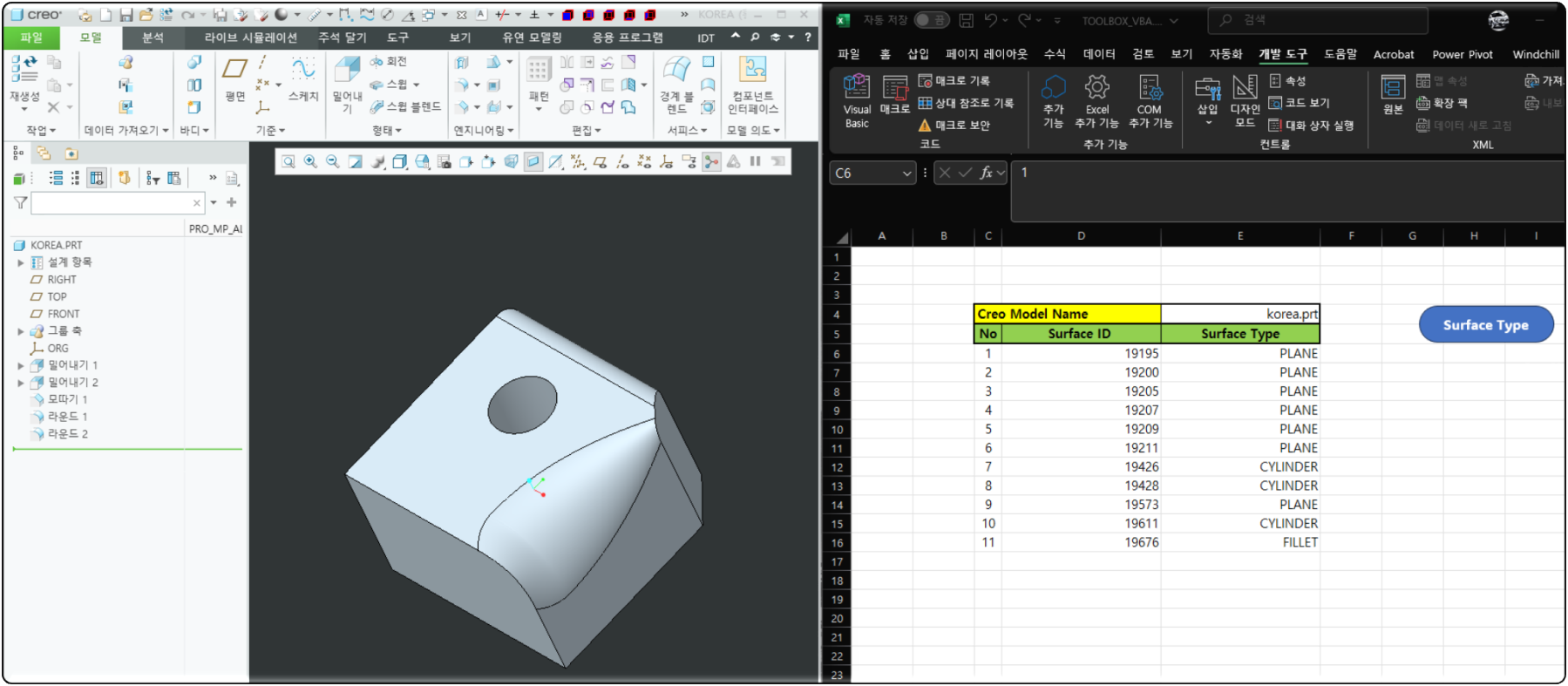
Part를 구성하는 서피스 유형을 표시 합니다. 서피스가 가지고 있는 id를 표시 합니다. 서피스 id별로 유형을 표시
Displays the surface type that makes up the part. Displays the id that the surface has. Displays the type by surface id

▷ Excel VAB 프로그램 화면 (Excel VBA program screen)
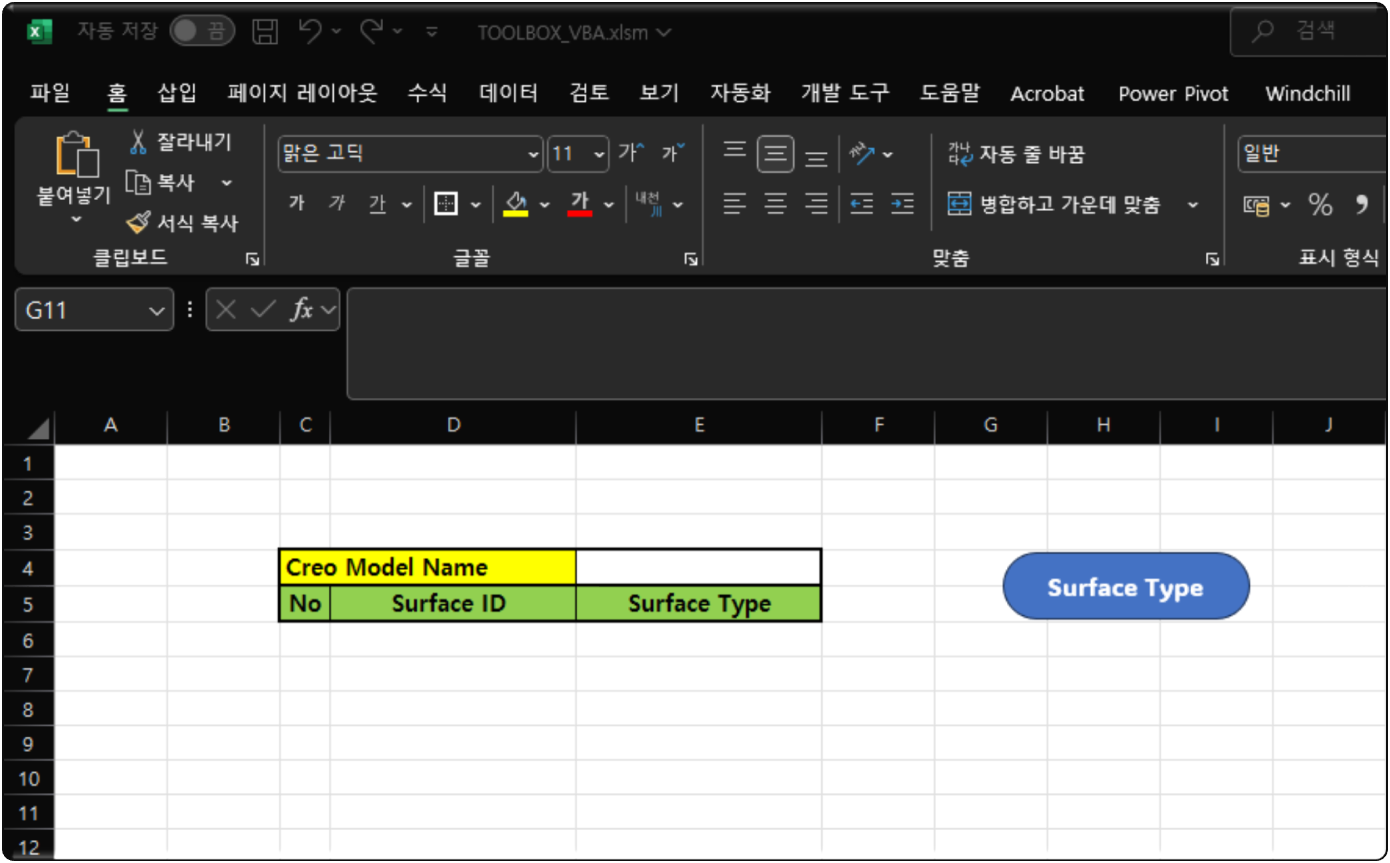
- Surface ID : 모델이 가지고 있는 고유의 서피스 ID를 표시 합니다.
- Surface Type : 서피스 ID별로 유형을 표시 합니다.
- Surface ID: Displays the unique surface ID of the model.
- Surface Type: Displays the type by surface ID.
▷ Surface type analysis code
The above file is the module used for "Call CreoVBAStart02.CreoConnt02".
Option Explicit
Sub CreoSurfaceId()

    On Error GoTo RunError
    Application.EnableEvents = False

     '// Creo Connection
    Call CreoVBAStart02.CreoConnt02

    Dim model As pfcls.IpfcModel
    Dim ModelItemOwner As IpfcModelItemOwner
    Dim ModelItems As pfcls.IpfcModelItems
    Dim Feature As pfcls.IpfcFeature
    Dim ModelSurfaces As pfcls.IpfcModelItems
    Dim ModelSurface As pfcls.IpfcModelItem
    Dim Surface As pfcls.IpfcSurface
    Dim ws As Worksheet

    Set ws = ThisWorkbook.Worksheets("surfaceid")

    Dim i As Integer

    Set model = BaseSession.CurrentModel
    ws.Cells(4, "E") = model.fileName
    Set ModelItemOwner = model
    Set ModelItems = ModelItemOwner.ListItems(EpfcModelItemType.EpfcITEM_SURFACE)

    For i = 0 To ModelItems.Count - 1

         Set ModelSurface = ModelItems.Item(i)
         Set Surface = ModelSurface

         ws.Cells(6 + i, "C") = i + 1
         ws.Cells(6 + i, "D") = ModelSurface.ID
         Select Case Surface.GetSurfaceType
            Case 0: ws.Cells(6 + i, "E") = "PLANE"
            Case 1: ws.Cells(6 + i, "E") = "CYLINDER"
            Case 2: ws.Cells(6 + i, "E") = "CONE"
            Case 3: ws.Cells(6 + i, "E") = "TORUS"
            Case 4: ws.Cells(6 + i, "E") = "RULED"
            Case 5: ws.Cells(6 + i, "E") = "REVOLVED"
            Case 6: ws.Cells(6 + i, "E") = "TABULATED_CYLINDER"
            Case 7: ws.Cells(6 + i, "E") = "FILLET"
            Case 8: ws.Cells(6 + i, "E") = "COONS_PATCH"
            Case 9: ws.Cells(6 + i, "E") = "SPLINE"
            Case 10: ws.Cells(6 + i, "E") = "NURBS"
            Case 11: ws.Cells(6 + i, "E") = "CYLINDRICAL_SPLINE"
            Case 12: ws.Cells(6 + i, "E") = "SPHERICAL_SPLINE"
            Case 13: ws.Cells(6 + i, "E") = "FOREIGN"
            Case 14: ws.Cells(6 + i, "E") = "SPL2DER"
            Case 15: ws.Cells(6 + i, "E") = "nil"
            Case Else: ws.Cells(6 + i, "E") = "Unknown Surface Type"
        End Select

    Next i

     MsgBox "completed analyzing the surface type", vbInformation, "korealionkk@gmail.com"

    '// Disconnect with Creo
conn.Disconnect (2)


CleanUp:
    Set asynconn = Nothing
    Set conn = Nothing
    Set BaseSession = Nothing
    Set model = Nothing

RunError:
            If Err.Number <> 0 Then
                MsgBox "Process Failed: An error occurred." & vbCrLf & _
                       "Error No: " & CStr(Err.Number) & vbCrLf & _
                       "Error Description: " & Err.Description & vbCrLf & _
                       "Error Source: " & Err.Source, vbCritical, "Error"
                If Not conn Is Nothing Then
                    If conn.IsRunning Then
                        conn.Disconnect (2)
                    End If
                End If
            End If


End Sub
▷ Enum EpfcSurfaceType
| EpfcSurfaceType Number | EpfcSurfaceType | Details |
| 0 | EpfcSURFACE_PLANE | A planar surface |
| 1 | EpfcSURFACE_CYLINDER | A cylindircal surface |
| 2 | EpfcSURFACE_CONE | A conic surface |
| 3 | EpfcSURFACE_TORUS | A toroidal surface |
| 4 | EpfcSURFACE_RULED | A surface created by linearly interpolating between two sets of curves. |
| 5 | EpfcSURFACE_REVOLVED | A surface created by revolving a curve about an axis |
| 6 | EpfcSURFACE_TABULATED_CYLINDER | A surface created by linearly projecting a curve |
| 7 | EpfcSURFACE_FILLET | A fillet surface |
| 8 | EpfcSURFACE_COONS_PATCH | A Coons path surface |
| 9 | EpfcSURFACE_SPLINE | A spline surface |
| 10 | EpfcSURFACE_NURBS | A Non-Uniform Rational B-Spline surface |
| 11 | EpfcSURFACE_CYLINDRICAL_SPLINE | A spline surface created using cylindrical coordinates |
| 12 | EpfcSURFACE_SPHERICAL_SPLINE | Reserved for internal use. |
| 13 | EpfcSURFACE_FOREIGN | A foreign surface |
| 14 | EpfcSURFACE_SPL2DER | A spline surface with 2 derivatives |
| 15 | EpfcSurfaceType_nil | Use this enumerated value to represent "null" passed to optional properties or method arguments. |
 creo Surface Type.cls
0.00MB
creo Surface Type.cls
0.00MB
▷ youtube
Analyze the above program code using AI
by korealionkk@gmail.com
반응형